Webhooks vs APIs: The Difference and When to Use Each (2026)
Webhooks and APIs are both ways for software systems to communicate. The simplest difference: an API responds when you ask, a webhook fires when something happens. If you need data on demand, you call an API. If you need to know when something changes without polling for it, you use a webhook.

This guide covers what each is, when to use which, and how to operate both in production. Most modern integrations use both, with each handling the part of the workflow it is best at.
What is an API?
An API (Application Programming Interface) is a contract that lets one piece of software ask another for data or for an action. The caller initiates the request, the server processes it and returns a response, and the caller does something with the response. This is the request-response pattern that powers most modern software integration.
For a deeper take on what an API actually is, our API acronym guide walks through the term in detail. For this post, the relevant property is that APIs are pull-based: the caller drives the timing.
What is a webhook?
A webhook is an HTTP callback. The webhook provider lets you register a URL with them; when an event happens on the provider’s side, the provider sends an HTTP POST to your URL with a payload describing the event. You receive the data without having asked for it.
Common patterns: Stripe sends webhooks when a payment succeeds or fails. GitHub sends webhooks when a push, pull request, or issue occurs. Slack sends webhooks when a user interacts with your app. The receiving application reacts to the event by updating its own state.
A webhook is sometimes called a “reverse API.” That framing is intuitive: with an API, you call the provider; with a webhook, the provider calls you.
Webhooks vs APIs: the core difference
| Property | API | Webhook |
|---|---|---|
| Direction | Client calls server | Server calls client |
| Trigger | Client-initiated | Event-driven |
| Timing | When the client decides | When the event happens |
| Use case | On-demand data retrieval | Real-time event notification |
| Server-to-server side | Server hosts the endpoint | Client hosts the endpoint |
The terminology gets confusing because both sides are “servers” in some sense. The cleanest way to think about it: with an API, you initiate. With a webhook, the other side initiates.
When to use a webhook
Webhooks are the right choice when you need to react to events as they happen, without polling.
- Payment events. Stripe’s
charge.succeeded,charge.failed,invoice.payment_failed. You want to know immediately when money state changes. - CRM and lead capture. Form submission triggers a webhook to your CRM, which creates the lead record. Real-time beats batch import.
- Content updates. A document is edited in one system; downstream systems receive a webhook and re-render or re-index.
- CI/CD events. GitHub pushes trigger CI runs via webhook; CI completion triggers deployment via another webhook.
- Authentication events. A user logs in; a webhook fires to your security log or fraud detection system.
- Inventory changes. Stock levels update in your warehouse system; webhooks notify your storefront so the front page reflects availability.
The common pattern: a state change on one side that something on the other side needs to know about immediately.
When to use an API
APIs are the right choice when you need data or want to take an action, on demand.
- Fetching current state. “What is this customer’s current balance?”, API call.
- Creating or updating records. “Create a new charge for this customer”, API call.
- Listing or searching. “Give me all orders from this customer in the last 30 days”, API call.
- Triggering computation. “Generate a PDF invoice for this order”, API call.
- Bulk operations. “Update the price on 10,000 products”, API call, possibly using a bulk endpoint.
The common pattern: client decides when, what, and how much, and the API responds with whatever the question or action requires.
Side-by-side comparison
| Feature | Webhooks | APIs |
|---|---|---|
| Initiation | Provider (event-driven) | Client (request-response) |
| Real-time vs polling | Real-time delivery | Polling, unless paired with webhook |
| Direction | One-way (provider → consumer) | Two-way (client ↔ server) |
| Setup | Consumer hosts an endpoint and registers it | Client knows the API URL and credentials |
| Protocols | HTTP POST with JSON | HTTP with REST, GraphQL, gRPC, or SOAP |
| Best for | Event notification, async workflows | On-demand data, mutations, queries |
| Failure handling | Provider retries delivery | Client retries the request |
| Authentication | HMAC signing in the request | Bearer token, mTLS, etc. |
Webhook delivery best practices
This is the part of webhooks most teams underestimate when they first ship them. A few patterns that hold up in production:
- Respond quickly. Acknowledge the webhook within a few seconds (2xx response) and process the payload asynchronously. If you do heavy work synchronously, the provider will time out and retry, and you will have processed the same event twice.
- Use HMAC signing. Providers sign the webhook payload with a shared secret; you verify the signature before processing. Without this, anyone who can reach your endpoint can forge events. Stripe, GitHub, Shopify, and most modern providers ship signed webhooks.
- Make handlers idempotent. Webhook providers retry on failure, which means you might receive the same event twice. Use a unique event ID to deduplicate. Without this, a transient failure becomes a duplicate charge or a duplicate email.
- Respect retry headers. When you cannot process a webhook successfully, return a clear status code (typically 5xx) so the provider retries. The retry schedule is provider-specific but usually follows exponential backoff over several hours or days.
- Expose delivery status to consumers. If you are the webhook publisher, give consumers a dashboard showing what was delivered, what failed, and why. Homemade webhook implementations often skip this and the customer-support load grows accordingly.
The HTTP status code conventions we cover separately apply here: 2xx for acknowledged, 4xx if the payload is invalid (no retry), 5xx for transient failures (retry).
Webhooks in 2026: agents and event-driven AI workflows
Two changes are worth flagging.
AI agents trigger webhooks too. Workflows that fire when an event happens are increasingly mediated by AI agents. The pattern: a webhook arrives at an agent endpoint, the agent decides what to do with the event (call an API, send a message, update a record), and a downstream system reflects the action. Designing webhook payloads with enough context for an agent to make the right decision matters in a way it did not three years ago.
Event-driven AI workflows are scaling. Beyond traditional webhook patterns, async event streams (Kafka, AWS EventBridge, Google Pub/Sub) feed AI workflows that process events in near-real-time. The webhook is often the trigger that injects events into the stream. The principles (signing, idempotency, retry) carry over.
How Moesif uses webhooks for monetization
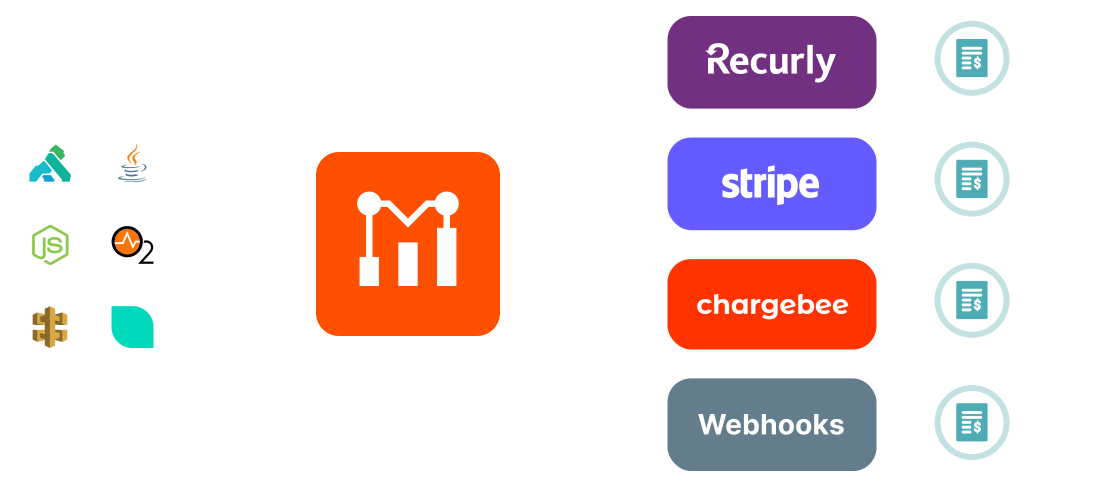
Moesif ships webhooks for monetization use cases. When a customer’s usage crosses a billing threshold, Moesif sends a webhook to your billing platform (Stripe, Recurly, Chargebee) with the usage data attached. The billing platform creates the invoice line item; your customer sees the charge on their next bill.
This is the pattern most usage-based billing setups converge on: a metering platform that counts API consumption, a billing platform that turns metered usage into invoices, and webhooks that connect the two. Moesif’s usage-based billing handles the metering and webhook sync; your billing platform handles the financial side.
Next steps
Webhooks and APIs are complementary patterns. Pick the one that matches the direction of initiation: APIs when you decide when to ask, webhooks when you want the other side to push events to you. In production, the two together handle most integration use cases.
If you are building a product that meters API consumption and bills back via webhooks, start a 14-day Moesif free trial to see webhook-driven billing sync in action. No credit card required.
Frequently asked questions
Are webhooks APIs? Webhooks use HTTP and have endpoints, so technically they are an API pattern. The terminology distinguishes them from request-response APIs because the direction of initiation is reversed.
Which is better, webhooks or APIs? Different tools for different jobs. Use APIs for on-demand data retrieval and actions; use webhooks for real-time event notifications. Most production integrations use both.
How do webhooks work? The provider lets you register a URL. When an event happens on the provider’s side, they send an HTTP POST to your URL with a payload describing the event. Your endpoint processes the event and acknowledges with a 2xx response.
Are webhooks secure? They can be, if implemented correctly. The standard pattern is HMAC signing: the provider signs the payload with a shared secret, and the consumer verifies the signature before processing. Always validate signatures; never trust webhook payloads without verification.
How do I handle webhook retries? Acknowledge webhooks quickly (2xx response) and process asynchronously. Return 5xx on transient failures so the provider retries. Make handlers idempotent by deduplicating on event ID.
Can webhooks replace APIs? No. Webhooks notify of events; they do not replace on-demand data retrieval. Most integrations use both: APIs for queries and mutations, webhooks for event notifications.

Related Articles

API Strategy
Leveraging AI For a Better API Strategy
Learn how to leverage AI to build and fortify your API strategy. Improve design, governance, documentation, and align APIs with business outcomes.
API Strategy
The 5 Best Mixpanel Alternatives of 2025
Learn about the best Mixpanel alternatives to determine the right analytics solution for your use case.

API Development
How to Leverage Moesif Effectively for API Observability
Effectively leverage Moesif for API observability through best practices for integration, event enrichment, custom actions, and engineering workflow integrat...
API Strategy
How to Build an Internal Chargeback Model for Your API and AI Usage Using Moesif
Use Moesif to implement internal chargebacks and enable precise API and AI cost attribution for better transparency and resource optimization.