HTTP Status Codes: The Developer’s Reference (2026)

HTTP status codes are the three-digit numbers a server returns with every response. 200 OK, 404 Not Found, 500 Internal Server Error: those are the ones everyone knows. The full set runs to dozens of codes, but in practice you will use maybe fifteen of them across the entire lifetime of an API.

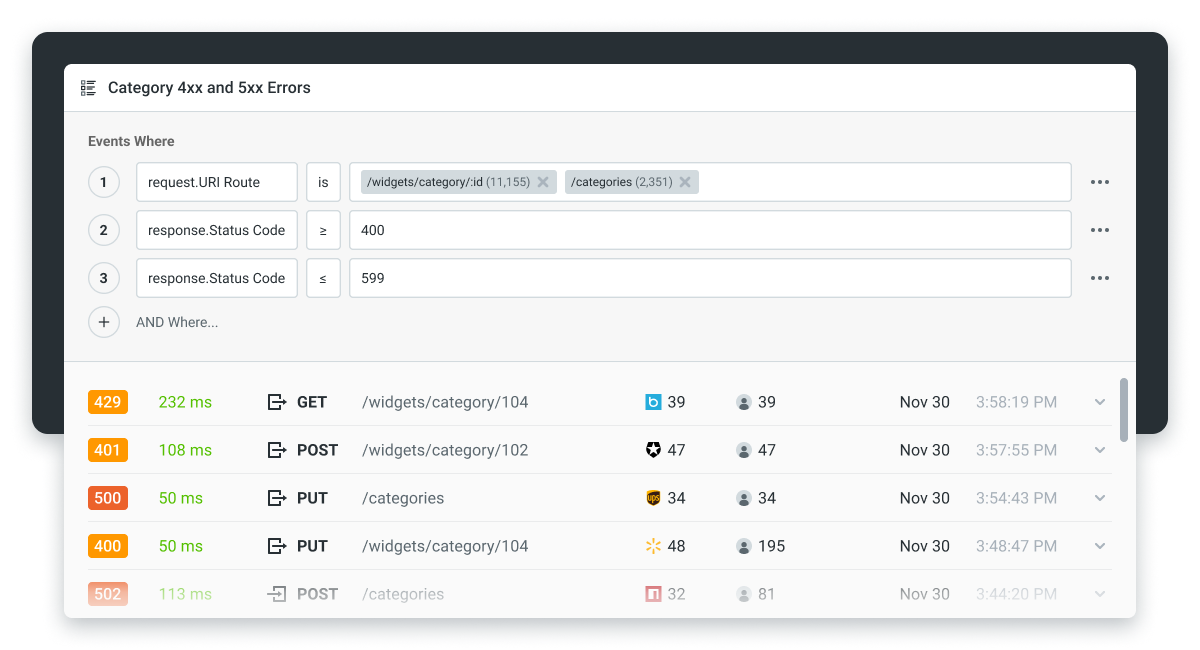
This guide covers what each code actually means from the perspective of someone building or integrating with an API endpoint, what the response body should look like, and the 2026 wrinkles around idempotent retries, webhook delivery, and AI agent traffic. It is not a replacement for the IETF reference at iana.org or the MDN documentation, both of which are excellent. It is the practical version you can keep open while debugging.
What HTTP status codes are (and why they matter for API design)
A status code is the first signal a client gets about what happened. Before parsing the response body, before reading any headers, the client knows from the status code whether the request succeeded, failed, was redirected, or hit a server problem.
For an API designer, this matters because the status code is the universal contract: every HTTP client in every language understands them the same way. If your API returns the right code, libraries handle retries correctly, browsers cache correctly, and proxies behave correctly. If your API returns a 200 OK containing {"error": "not found"} instead of a real 404, you are forcing every consumer to parse the body to figure out what happened. That breaks decades of established tooling.
Choosing the right code per endpoint is part of API design principles, and it is one of the design choices that compounds over time. Every consumer of your API will write code that depends on the codes you return, and changing them later is a breaking change.
The five families at a glance
| Range | Family | What it means |
|---|---|---|
| 1xx | Informational | The request is in progress (rarely used in REST APIs) |
| 2xx | Success | The request worked |
| 3xx | Redirection | The resource is somewhere else |
| 4xx | Client error | The request was wrong |
| 5xx | Server error | The server failed to process a valid request |
Most APIs in 2026 only use a small subset within each family. The sections below cover the ones developers actually return and consume.
1xx informational
You will almost never see these in a REST or GraphQL API. They exist mostly for low-level HTTP plumbing.
- 100 Continue. The server is telling the client “I got your headers, go ahead and send the body.” Used in large uploads where the client wants to check the server is willing to accept the request before sending megabytes of data.
- 101 Switching Protocols. The server is upgrading the connection, usually from HTTP to WebSocket.
If you are designing a normal API, you can ignore 1xx.
2xx success codes you actually use
- 200 OK. The default success code. Use it for
GET,PUT,PATCH, andDELETEwhen the request completed and you are returning the resource (or, forDELETE, an empty body). - 201 Created. Use this for
POSTwhen you created a new resource. Include the URL of the new resource in theLocationresponse header, and return the new resource in the body. - 202 Accepted. The request is valid and will be processed asynchronously. Used for long-running jobs (think “this report will be ready in a few minutes”). Pair with a job ID the client can poll.
- 204 No Content. The request succeeded but there is no body to return. Common for
DELETEoperations, especially in APIs that prefer no body over an empty{}. - 206 Partial Content. The server returned only part of the resource because the client asked for a range (large file downloads, video streaming).
The mistake to avoid: returning 200 OK with {"success": false} instead of the appropriate error code. The status code is the contract; do not overload the body to compensate for the wrong code.
3xx redirects
- 301 Moved Permanently. The resource has a new permanent URL. Search engines update their index; browsers cache the redirect. Use for permanent URL restructures.
- 302 Found. Temporary redirect. The resource is somewhere else right now but the original URL is still the canonical one.
- 303 See Other. After a
POSTsucceeds, redirect the client to do aGETon a different URL. The classic “post/redirect/get” pattern. - 304 Not Modified. Conditional response when the client sent an
If-None-Match(ETag) orIf-Modified-Sinceheader and the resource has not changed. Saves bandwidth. - 307 Temporary Redirect. Like 302 but the client must repeat the same HTTP method (a
POSTstays aPOSTafter the redirect, which 302 does not guarantee). - 308 Permanent Redirect. Like 301 but preserves the HTTP method, the same way 307 does for 302.
In modern API design, prefer 307 and 308 over 302 and 301 for redirect responses, because they explicitly preserve the request method. The older codes have historically been treated inconsistently across HTTP clients.
4xx client errors (the ones you debug daily)
This family is the one developers spend the most time looking at.
- 400 Bad Request. The request is malformed: invalid JSON, missing required fields, wrong data types. Return a body with a machine-readable error code, a human-readable message, and ideally the field that failed validation.
- 401 Unauthorized. “You did not authenticate.” The credentials are missing or expired. The right fix is to authenticate.
- 403 Forbidden. “You authenticated, but you cannot access this resource.” Different from 401, because re-authenticating will not help. Used for permission errors.
- 404 Not Found. The resource does not exist. Use for missing IDs (
/users/9999). Do not use for “the route does not exist,” which is also 404 but for a different reason at the framework level. - 405 Method Not Allowed. The resource exists but does not accept the HTTP method you used (you tried to
DELETEan endpoint that only supportsGET). - 409 Conflict. The request would create a conflict with the current state. Common for duplicate-resource errors (“a user with this email already exists”).
- 410 Gone. Like 404, but with the explicit signal that the resource used to exist and has been intentionally removed. Useful for deprecated endpoints.
- 413 Payload Too Large. The request body exceeds your server’s limit.
- 415 Unsupported Media Type. The
Content-Typeof the request is not one the API accepts. - 422 Unprocessable Entity. The request is syntactically valid (parsed cleanly) but semantically wrong (failed business validation). Useful when you want to distinguish “your JSON is broken” (400) from “your JSON is fine, but the data violates a business rule” (422).
- 429 Too Many Requests. Rate limit exceeded. Always include a
Retry-Afterheader telling the client how long to wait.
A good 4xx response includes three things: the status code, an error.code machine-readable identifier, and a human-readable error.message. For validation errors, include the offending field. The standard shape most teams converge on:
{
  "error": {
    "code": "invalid_email",
    "message": "Email address is not valid.",
    "field": "email"
  }
}
5xx server errors
These are your responsibility, not the client’s.
- 500 Internal Server Error. The catch-all. The server encountered an unexpected problem. Return a request ID the client can quote to support; never return a stack trace.
- 502 Bad Gateway. The server is acting as a proxy and got an invalid response from an upstream service. Common when a load balancer cannot reach a backend.
- 503 Service Unavailable. The server is temporarily unable to handle the request (maintenance, overload, or deliberate circuit breaking). Include a
Retry-Afterheader. - 504 Gateway Timeout. Same proxy scenario as 502, but the upstream did not respond in time.
- 507 Insufficient Storage. Used for storage-quota errors on services that have one (uncommon for most REST APIs).
For 5xx responses, log enough on your side to debug the issue, and return a request ID in the response so your support team can trace the call. The client cannot fix a 5xx; only you can.
HTTP response headers you’ll see alongside status codes
The status code is the headline, but most of the actionable information lives in the response headers. A working API treats the headers as a first-class part of the contract, not a side channel.
Location is the destination on a 201 Created (pointing at the new resource) or a 3xx redirect. A POST /orders that returns 201 should include Location: /orders/42 so the client knows where to find the resource it just created.
Retry-After is the wait time on 429 Too Many Requests and 503 Service Unavailable. The value is either a number of seconds or an HTTP date. Well-behaved clients (and AI agents) parse this and back off accordingly; servers that return 429 without Retry-After give clients no signal except “try less.”
X-RateLimit-Remaining, X-RateLimit-Limit, and X-RateLimit-Reset let clients self-throttle before hitting 429. The convention is not formally standardized (GitHub, Twitter, and Stripe each have slightly different conventions), but pick one shape and apply it across every rate-limited endpoint.
Cache-Control and ETag turn on HTTP caching. Cache-Control: max-age=300 lets downstream caches (CDNs, browsers, proxies) reuse the response for 5 minutes. ETag is a resource version string that lets clients ask “has this changed since my cached copy?”; a 304 Not Modified response saves bandwidth and reduces backend load on read-heavy endpoints.
Allow is the response header on 405 Method Not Allowed that lists which methods the endpoint does accept. A client calling POST /users/{id} against an endpoint that supports only GET, PUT, DELETE should see Allow: GET, PUT, DELETE in the response.
WWW-Authenticate is the response header on 401 Unauthorized that tells the client which authentication scheme the endpoint expects. WWW-Authenticate: Bearer is the modern default; the older Basic realm="..." shows up on systems still on basic auth.
Sunset and Deprecation (IETF RFC 8594 and RFC 9745) signal that the endpoint is deprecated or scheduled for removal. Well-behaved SDKs surface these to developers at integration time.
Content-Type and Content-Length are the basics every response needs. APIs that omit Content-Type force clients to guess; APIs that omit Content-Length make streaming and progress reporting harder.
X-Request-Id (or Request-Id) is the per-request identifier the API should return on every response, success or failure. When a customer reports an issue, the request ID is what your support team uses to find the call in logs. APIs without it slow down every support ticket by a step.
Put together: a status code alone tells the client what happened, while the headers tell them what to do next.
Status codes for AI agent and webhook scenarios
This is the part of the conversation that did not exist five years ago and that most reference articles still skip.
AI agents retry. A lot. When an agent calls your API and gets a 5xx, it will retry, often aggressively. Two practices keep this safe:
- Make your
POSTendpoints idempotent. Accept anIdempotency-Keyheader from the client and return the same response on retry. Stripe and OpenAI both follow this pattern and it is the de facto standard. - Return 429 with a
Retry-Aftervalue rather than letting the agent hammer your server when it is overloaded. Agents respect 429 better than they respect 5xx.
Webhook delivery is its own game. When your API delivers a webhook to a customer’s endpoint and gets a non-2xx response, the convention is to retry with exponential backoff. Specifically:
- 2xx: delivered, done.
- 3xx: follow the redirect, then retry the original logic.
- 4xx: do not retry. The customer’s endpoint is rejecting the payload on purpose.
- 5xx and timeouts: retry with backoff (typical schedule: 1m, 5m, 30m, 1h, 6h, 24h).
If you are building the webhook publisher side, surface the delivery status to the customer’s dashboard so they can see what was delivered and what failed. Per-customer, per-event visibility is the part that tends to be missing in homemade webhook implementations.
How to return status codes correctly from your API
The framework you are using makes a difference. Express, FastAPI, Spring, ASP.NET, and Go’s standard library all have their own conventions for setting status codes. A few patterns that hold across all of them:
- Set the status code explicitly. Frameworks default to 200, which is wrong for most non-GET responses.
- Set the status before writing the body. Once bytes are flushing, you cannot change the code.
- Match the code to the actual outcome, not the easiest one. A “validation failed” response is 422 or 400, not 200 with an error string.
- Return JSON for
5xxresponses too, not HTML error pages. Your clients are programs, not browsers.
Once your API is live, the question becomes whether the codes you are returning match what consumers see in practice. Moesif API monitoring shows you the status code distribution per endpoint, per customer, in real time, which is how most teams discover they are silently returning the wrong code for a class of errors.
Where to take this next
The right status code is the cheapest part of API design and the easiest part to get wrong. If you are building an API and want to see whether the codes you return match what your customers actually experience in production, start a 14-day Moesif free trial and watch the status code distribution per endpoint roll in. No credit card required.
Frequently asked questions
What does HTTP status code 200 mean? The request succeeded and the server is returning the requested data. It is the default success response for GET, PUT, PATCH, and DELETE operations.
What is the difference between 401 and 403? 401 means you are not authenticated (no credentials, or credentials are invalid). 403 means you are authenticated but you do not have permission to access this resource. Re-authenticating fixes 401; it does not fix 403.
Why do I keep getting 429 errors? You are exceeding the rate limit set by the API. Check the Retry-After header in the response, wait that long, and try again. Long-term, implement client-side throttling that respects the X-RateLimit-Remaining header.
What is the difference between 500 and 503? 500 is an unexpected server error (a bug or unhandled exception). 503 is a deliberate “we are temporarily unavailable” response, usually for maintenance or overload. 503 implies the server will be back; 500 implies you do not know what just happened.
Should I create custom HTTP status codes? No. The 100-599 space is reserved by the IETF, and HTTP clients, proxies, and frameworks treat unknown codes as the default for their range (an unknown 4xx is treated as 400). Stick to standard codes and put any custom information in the response body.
What do HTTP status codes beginning with 2xx indicate? Success. The server received the request, understood it, and processed it successfully. The most common is 200 (success with a response body); others include 201 (a new resource was created), 202 (the request was accepted for asynchronous processing), and 204 (success with no response body).
How can I get the HTTP status code from a URL? From a terminal, run curl -I <url> to make a HEAD request that returns only the status line and headers. From browser developer tools, open the Network tab, click the request, and look at the Status column. From code, use your HTTP client’s response object (response.status_code in Python requests, response.status in fetch, response.statusCode in Node).
What is an HTTP 200 status code? The standard success response. The server is returning the requested data in the response body. For GET requests, the body contains the resource; for PUT and PATCH, it usually contains the updated resource; for DELETE, the body is often empty (in which case 204 is more appropriate than 200).
What are the different categories of HTTP status codes? Five families, grouped by the first digit: 1xx (informational, the request is in progress), 2xx (success, the request worked), 3xx (redirection, the resource is somewhere else), 4xx (client error, the request was wrong), and 5xx (server error, the server failed to process a valid request).

Related Articles

API Strategy
Leveraging AI For a Better API Strategy
Learn how to leverage AI to build and fortify your API strategy. Improve design, governance, documentation, and align APIs with business outcomes.
API Strategy
The 5 Best Mixpanel Alternatives of 2025
Learn about the best Mixpanel alternatives to determine the right analytics solution for your use case.

API Development
How to Leverage Moesif Effectively for API Observability
Effectively leverage Moesif for API observability through best practices for integration, event enrichment, custom actions, and engineering workflow integrat...
API Strategy
How to Build an Internal Chargeback Model for Your API and AI Usage Using Moesif
Use Moesif to implement internal chargebacks and enable precise API and AI cost attribution for better transparency and resource optimization.