API Logs: What They Are and How to Use Them in 2026
An API log is a record of one API interaction: the request that came in, the response that went out, the metadata around both. Multiply that across every call your API handles and you have the raw material for debugging, performance work, security investigations, capacity planning, and customer support. A well-instrumented API turns its logs into the most useful telemetry an engineering team has.

This guide covers what API logs actually contain, the four types worth distinguishing, how to read them when something goes wrong, and the 2026 patterns around logging AI agent traffic. Most of this generalizes across any API stack; the specifics that matter for Moesif customers are called out where relevant.
What API logs are
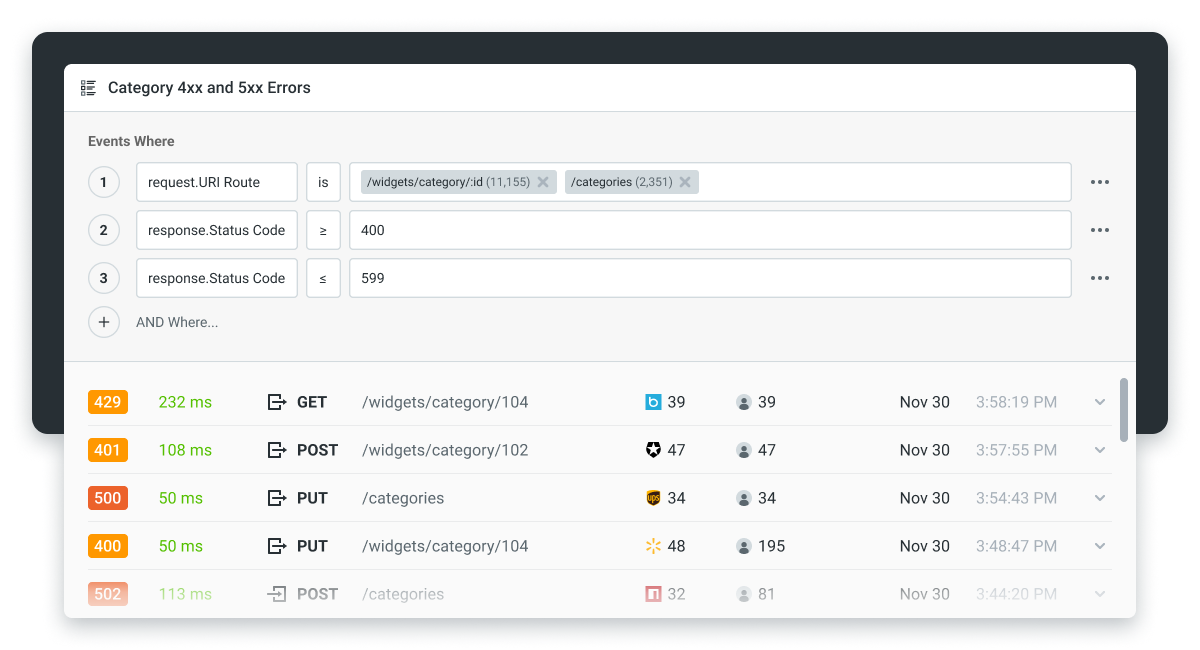
An API log entry captures one request-response pair plus the context around it. At minimum: timestamp, HTTP method, endpoint, status code, latency. At useful: request headers, query parameters, request body, response headers, response body, client identity, error details when present.
Logs differ from metrics in granularity. A metric tells you “the p95 latency on /orders was 240ms last hour.” A log tells you “customer X called POST /orders at 14:23:07, the request body was Y, the response was a 422 with this validation error, and the call took 312ms.” Both are necessary; metrics tell you something is wrong, logs tell you exactly what happened to whom.
The four types of API logs
Practitioners typically distinguish four categories. The same log entry can fall into more than one (a 500 error during a payment call is both an error log and a security-relevant audit entry); the categories are about which question you are answering when you read the logs.
- Access logs. The full record of every request: client IP, URL, method, status code, timestamp, latency. Useful for traffic patterns, top endpoints, geographic distribution, and bot detection.
- Error logs. Subset of access logs filtered to non-2xx responses, plus internal exceptions logged from inside the API. Useful for debugging and incident response.
- Performance logs. Per-request latency, throughput, and server resource usage. Useful for finding slow endpoints and capacity planning.
- Security logs. Authentication attempts (successful and failed), authorization checks, and any access to sensitive endpoints. Useful for incident investigation and compliance audits in regulated industries.
Most teams produce one log stream and tag entries with the appropriate category at query time, rather than maintaining four separate log files. The category is a view, not a storage format.
What a complete API log entry contains
A well-structured API log entry has six fields at minimum:
- Timestamp. The exact moment the request was received, in ISO 8601 format with UTC offset. Used to reconstruct the sequence of events across distributed systems.
- HTTP method and endpoint.
GET /users/42,POST /orders. Tells you what the client was trying to do. - Request details. Headers, query parameters, and body. Headers carry auth tokens and content negotiation; the body carries the actual payload. Sensitive fields (auth tokens, PII) should be masked at logging time.
- Response details. Status code, headers, body. Status code carries the outcome; body carries the result (success or error detail).
- Client identity. The customer or user the request belongs to. Without this, logs are anonymous and you cannot answer customer-specific questions.
- Latency. Time between receiving the request and sending the response, in milliseconds. Pair with status code to spot slow successes and fast failures.
Two optional fields that are increasingly standard: a request ID (returned to the client so they can quote it in support tickets) and a trace ID (for joining logs across services).
A request body that gets logged should be the post-validation body, not the raw bytes. Logging raw bytes risks logging malformed JSON and incomplete payloads. Logging the parsed object preserves what the API actually understood.
What an API logger actually does (libraries, middleware, gateways)
People say “API logging” to mean four different implementations. They are not interchangeable, and the choice between them shapes which questions you can answer from your logs.
Application-level library. A logging library inside your application code (Python’s standard logging, Winston for Node.js, Logback for Java) writes structured entries when application code chooses to log. Full context (you know which user, which function, which line of code triggered the log), but every service has to opt in, log levels and formats drift across teams, and you can only log what the application explicitly chooses to.
HTTP middleware. A framework-level interceptor (FastAPI middleware, Express middleware, Django middleware) that runs on every request and response and writes a log entry without the route handler having to do anything. Complete request/response coverage without per-route code, but still scoped to one service; consistency across services requires every service to install the same middleware.
API gateway logging. The API gateway (WSO2, Kong, AWS API Gateway, Apigee, Envoy) sits in front of every backend service and logs every request as it passes through. Zero application code; coverage is complete by definition; format is consistent across services because the gateway controls it. The gateway sees what crossed the wire but not what happened inside the service, so deep application-level events still need application logs.
Dedicated API analytics platform. A purpose-built layer (Moesif, in this case) that integrates with the gateway or middleware, captures the full request/response with customer identity attached, and stores the events in a query model optimized for per-customer, per-endpoint analytics rather than raw search. Business-level questions (which customers are growing, which endpoints are most-used by paying customers, where AI agents are retrying) are answerable from the same dataset as engineering-level questions. The trade-off is paid SaaS and one more vendor relationship.
The right answer for most production setups is two of these stacked: gateway logging for the wire-level record of every call, plus a dedicated analytics platform for the business-level views. Application logs and middleware logs handle the deeper engineering debugging cases where you need code-level context.
A note on the term “API logger.” You will see it used three ways in 2026: as a synonym for an HTTP-middleware logger (the most common informal usage), as a product name for SDKs that wrap a logging service, and occasionally as a category description for any tool that records API traffic. The category is broader than any one tool; the practical question is which of the four implementations above fits your use case.
Tools for collecting and analyzing API logs
The tool choices fall into two categories: general-purpose log aggregators, and API-specific observability platforms.
General-purpose log aggregators. These collect any text-formatted log and provide search and visualization over it. They work for API logs but you build the API-specific views yourself, and the per-customer business analytics that drive API product decisions are not part of what they ship.
- ELK Stack (Elasticsearch, Logstash, Kibana). Open-source. Elasticsearch indexes the logs, Logstash ingests them, Kibana visualizes. Common starting point for self-hosted log infrastructure.
- Splunk. Commercial. Established query language and dashboarding, often deployed at enterprise scale. Pricing scales aggressively with data volume; the business-level views (per-customer behavior, revenue attribution) are not part of the default offering.
- Graylog. Open-source. Lighter than ELK, simpler to operate at small scale.
- Datadog. Commercial. Combines logs with metrics and traces; common where the team already uses Datadog for infrastructure monitoring. Built around system health rather than per-customer API analytics.
API-specific observability platforms. These understand the request-response structure of an API call natively, which means the views and alerts are tuned to API-specific questions (per-customer behavior, per-endpoint error rates, payload-aware analytics) rather than generic log search.
- Moesif is purpose-built for this approach. It instruments API gateways (WSO2, Kong, AWS, Azure, Envoy) and application SDKs, ingests the full request/response per call, and presents the data in views built around the customer journey: who is calling what, where they are stalling, which endpoints are erroring, what behavior predicts churn.
The right tool depends on the question you are answering. If your dominant use case is engineering-facing debugging and infrastructure log search, an ELK or Splunk install is appropriate. If your use case includes product analytics, customer behavior, monetization, or per-customer error attribution, an API-specific platform pays for itself quickly by answering those questions out of the box.
Reading API logs for troubleshooting and performance
The skill that matters most is reading logs in the moment, not reading them in aggregate.
When an issue is reported, the first questions are:
- Which request? Find the exact log entry by timestamp, customer, endpoint, or request ID. The faster this is, the cheaper the incident.
- What happened to it? Look at the status code first, then the error detail in the response body, then the latency.
- Is it isolated or systemic? Filter to the same endpoint or the same customer for the past hour. A single error is a customer support ticket; a pattern of errors is an outage.
- What changed? Cross-reference the log spike with deploys, configuration changes, dependency outages, or upstream API changes.
The pattern most production teams converge on is “alert on aggregates, investigate on individual logs.” Alerts fire when error rates spike or latency degrades; engineers then drop into the log stream to find specific examples and read what actually happened.
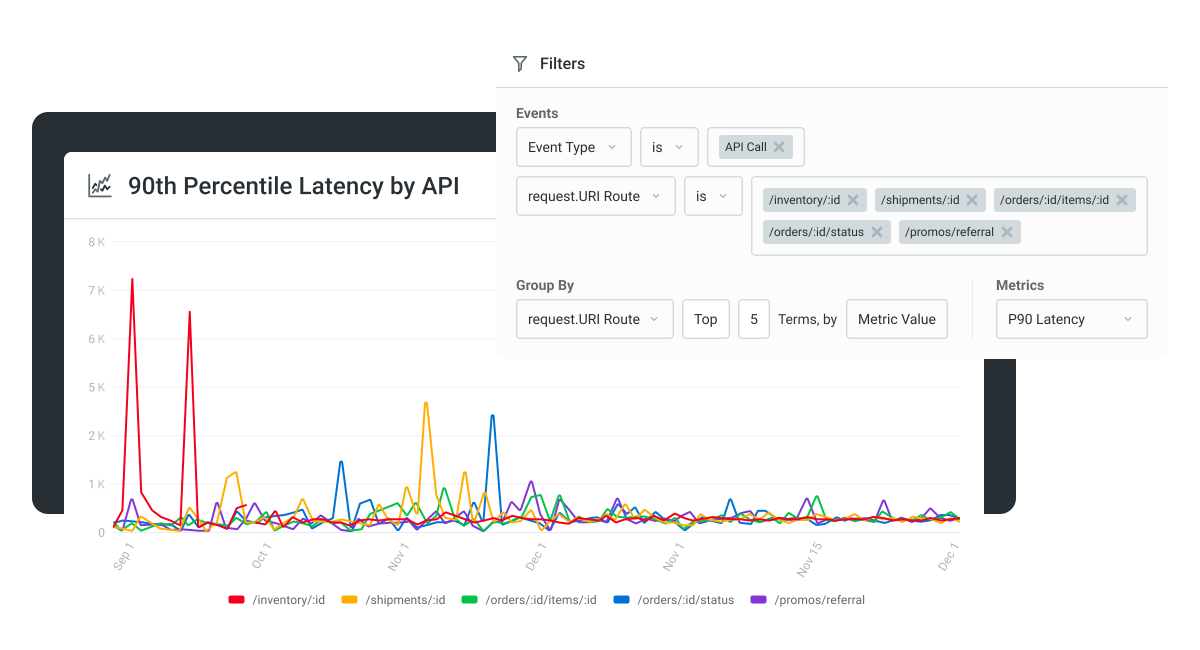
Performance investigations follow the same pattern. A p95 latency spike on /orders shows up as a metric; the logs tell you whether the spike is a slow database query, an upstream API timing out, or one large customer hammering the endpoint with payloads ten times the normal size.
For the underlying status code semantics that error logs depend on, see our HTTP status codes guide.
API logging best practices
Five patterns that hold up across stacks:
- Be selective. Over-logging is the most common mistake. Log everything you might need to debug an incident; do not log everything you can capture. Noise drowns signal, and at any meaningful traffic volume, storage cost is real.
- Use structured logging. Logs in JSON (or another structured format) are queryable; unstructured text logs are not. Every field that matters for filtering should be a top-level key.
- Mask sensitive data at logging time. Authorization tokens, credit card numbers, social security numbers, and healthcare identifiers do not belong in logs. Masking has to happen before the log is written, not after.
- Standardize the schema across services. If three services log the same thing three different ways, joining them is painful. Use a shared schema (timestamp, method, endpoint, status, latency, customer ID) across the entire API surface.
- Set retention by category. Access logs need 30-90 days for operational use. Security logs need years for compliance. Performance logs need enough history to compare across release cycles. Pick a retention per category; do not retain everything forever or you will pay for it.
These are the design-time decisions that compound. They cost very little to set up correctly on day one and a lot to retrofit later.
API logs in 2026: agent traffic and AI observability
Two changes are worth flagging if your API logging strategy was last updated before 2024.
Agent traffic needs per-agent attribution. A growing share of API calls in 2026 comes from AI agents acting on behalf of users. Per-customer attribution is no longer enough; you also need to know which agent runtime, which agent session, and which workflow originated the call. Without this, “customer X is hitting our API ten times per second” could mean ten things, only some of which are actionable.
Two practical changes: include an agent identifier in your logging schema (a header like X-Agent-Id or a field derived from auth scope), and instrument the log view to surface agent-vs-human breakdowns alongside the existing per-customer cuts.
LLM inputs and outputs deserve their own log category. When your API wraps an LLM call (chat completion, RAG over your data, classification), the log entry should include the prompt sent to the model and the response received. This is for the same reasons regular API logs exist: debugging when the model returns wrong output, tracking which prompts cost the most, and meeting compliance requirements around what was sent to a third-party model.
Most teams that hit this need build a parallel log stream for LLM-mediated calls. Platforms like Moesif handle this in the same observability layer as regular API logs, which keeps the analysis path consistent.
Common API logging mistakes
Patterns that show up across customer reviews:
- Logging everything to a single file with no schema. Searchable in the worst possible way. Fixed by switching to structured logging early.
- Logging sensitive data in request bodies. Auth tokens and PII end up in logs, then in log backups, then in incident-response timelines. Mask at logging time, not after.
- No customer attribution. Logs that do not identify the customer making each call cannot answer customer-specific questions. Tag every log entry with a customer ID.
- Inconsistent retention. Logs you kept for ninety days are missing the audit trail you need for the SOC 2 review. Define retention per category, write it down, automate the deletion.
- Logging at the application without logging at the gateway (or vice versa). Both layers see different things. Application logs miss requests blocked at the gateway; gateway logs miss requests that fail inside business logic. You want both.
The cost of getting this right is mostly upfront design work. The cost of getting it wrong shows up later as long incident investigations, failed audits, and customer-support tickets that take hours instead of minutes.
Next steps
API logs are one of the highest-leverage pieces of telemetry an API team can produce. The design decisions are mostly upfront: schema, retention, sensitive-data masking, customer attribution, agent tagging. Once those are in place, the logs become the substrate for everything from debugging to product analytics to compliance audits.
To see what live API logs look like with per-customer, per-endpoint, payload-level visibility across any gateway, start a 14-day Moesif free trial. No credit card required.
Frequently asked questions
What is the difference between an API log and an audit log? An API log records every request-response pair; an audit log is a subset focused on security-relevant events (authentication attempts, permission changes, access to sensitive resources). Audit logs are usually subject to stricter retention and access controls.
Should I log request and response bodies? Yes for debugging, with sensitive fields masked. The bodies are where the actual information lives; status codes alone do not tell you what the customer sent or what you returned. Mask auth tokens, PII, and any field your compliance posture requires.
How long should I retain API logs? Access logs typically 30-90 days for operational use. Performance logs 90-180 days to track release-over-release changes. Security logs longer (1-7 years depending on your compliance requirements). Match retention to what each category is used for.
Where should I send API logs? A central platform that supports search, alerting, and structured queries. ELK, Splunk, Graylog, or Datadog are general-purpose options; Moesif is the API-specific option. The right answer depends on whether your dominant use case is engineering-facing debugging (general-purpose works) or customer-facing analytics and monetization (API-specific is faster).
Are API logs subject to GDPR or HIPAA? Yes, if they contain personally identifiable information. Mask PII at logging time, enforce access controls on the log store, and align retention with the relevant regulation. For HIPAA specifically, logs touching protected health information need encryption at rest and tightly controlled access.
How do I log AI agent traffic differently from human traffic? Include an agent identifier in your logging schema, and instrument your analytics to surface agent-versus-human breakdowns. The interesting questions about agent traffic (which workflow, what retry pattern, which model) are different from the interesting questions about human traffic.

Related Articles

API Strategy
Leveraging AI For a Better API Strategy
Learn how to leverage AI to build and fortify your API strategy. Improve design, governance, documentation, and align APIs with business outcomes.
API Strategy
The 5 Best Mixpanel Alternatives of 2025
Learn about the best Mixpanel alternatives to determine the right analytics solution for your use case.

API Development
How to Leverage Moesif Effectively for API Observability
Effectively leverage Moesif for API observability through best practices for integration, event enrichment, custom actions, and engineering workflow integrat...
API Strategy
How to Build an Internal Chargeback Model for Your API and AI Usage Using Moesif
Use Moesif to implement internal chargebacks and enable precise API and AI cost attribution for better transparency and resource optimization.