How to Build an Internal Chargeback Model for Your API and AI Usage Using Moesif

API and AI services now sit at the heart of modern products. However, the more we use them, the harder it seems to become to account for the budget.
Launching an AI product often leads to massive end-of-period bills. This requires attributing costs to the key internal power users and consumption drivers. The challenge is identifying the departments, products, or projects responsible for the consumption, and the extent to which they contribute. Vanity metrics alone, like API calls or token counts, don’t explain growth drivers. You need deeper, more attributable metrics to effectively manage and understand the spend.
This post discusses how an internal chargeback model provides a framework for gaining clarity and an actionable strategy when launching a new AI API program.

The Problem of Unaccounted API and AI Usage
Opaque Costs in Distributed Systems
APIs and AI workloads stand across multiple services, gateways, and cloud providers. When a request goes through this stack, the compute and network costs quietly accumulate across systems, like load balancers, AI models, databases, and storage layers. By the time these activities appear in invoices, they’ve lost important business context:
- Which department generated the usage?
- Which product drove the associated costs?
- Which team should own the bill?
Metrics Lacking Ownership
Most organizations can collect usage data: API call counts, latency distributions, or token consumption metrics. But how many of those connect to identity and ownership? Many organizations lack fine-grained tooling to translate usage into a coherent strategy. For example, consider an endpoint that logs millions of calls each day, but without consistent tagging through entities like headers or metadata. Those events remain anonymous from a cost-allocation outlook, and thus engender attribution gaps. Finance sees aggregate usage, while engineering sees operational activity, and neither can reconcile the two.
The Complexity of AI Cost Attribution
In production AI systems, one request often results in a distributed chain of model and data operations across different infrastructure layers. Consider an enterprise search assistant. It can answer employee questions using internal data sources and APIs. To satisfy a user query, one AI request may trigger:
- An embedding model
- A vector DB lookup
- An LLM inference
Each of these can have disparate billing semantics:
- Embedding might charge per token
- Database can charge per compute unit
- The inference model can charge by input and output tokens
And when overall costs spike, the root cause is hard to ascertain:
- New user adoption
- Inefficient prompts
- Recursive bugs
Lack of end-to-end attribution makes it challenging to link costs to actual consumption. It also obscures responsibility and optimization opportunities.
Unaccounted use, while an accounting inconvenience, also skews engineering and product decisions. With no team directly responsible for resource consumption, overuse feels complimentary. It exacerbates overprovisioned services and development environment sprawl; shared APIs and AI decline into shared liabilities.
Chargeback models can solve this problem as it reintroduces causality between action and cost by treating resource usage as a billable, attributable event. Therefore, as an organization, before any pricing model or automation, establish the foundation for chargeback; every request, task, or AI invocation must carry consistent identifiers that link to the owning team or project. Then use Moesif to track, meter, and report the usage to measure accountability.
The Case for Internal Chargebacks
In most organizations, API and AI usage starts as a few shared services for internal teams. But it quickly becomes more complex with data pipelines, inference jobs, and model integrations. Each draws on shared compute, storage, and vendor-specific costs. To promote responsible consumption, you must allocate costs accurately to each team or department based on their actual usage. Without a structured budget allocation, every department benefits from the infrastructure, but none feel responsible for managing cost efficiency. An internal chargeback creates stewardship to design incentives for teams to stay on top of their monthly spend.
What is an Internal Chargeback Model?
An internal chargeback model assigns the cost of technology resources to the internal teams or products that consume them. Chargebacks create an internal transparency framework among teams, the platform no longer being a monolithic cost center. The model doesn’t change how APIs run; it changes how their costs are recognized and optimized.
A strong chargeback model requires three components:
- Measured Usage
- Clear units: requests, tokens, GB processed
- Unit Cost
- The financial rate tied to each unit
- Ownership Mapping
- Which department, product, or team generated the usage
Moesif provides the foundation for all three by converting raw API and AI events into billable, attributable metrics.
Why API and AI Workloads Require Chargebacks
API and AI systems have distinct cost dynamics in comparison to traditional apps. Their costs scale horizontally, as each new interaction, workflow, or user interaction adds measurable consumption. AI especially institutes variability: inference costs fluctuate by model type, prompt complexity, and token amounts. Without a chargeback model, these expenses blend into a shared cloud budget, hiding inefficient usage and encouraging overconsumption.
Chargebacks as Control
Chargebacks demonstrate real costs to the teams that generate them, and in doing so, encourage better architectural decisions. Developers learn to assess performance trade-offs against economic impact. Product owners can predict budgets grounded in actual resource usage and not ballpark figures. Platform teams and department heads, in turn, reap the benefits of data-driven decisions when rationalizing infrastructure investments or cost optimizations.
In Moesif, you can repurpose usage data already collected for analytics to distribute costs, using product catalog features in tandem with billing meters and custom webhooks; we will provide a demonstration in the later section.
Aligning Engineering and Finance
Reliable, near–real-time data on technology spend gives teams autonomy to track and manage their own consumption. Instead of budget surprises, discussions shift toward measurable efficiency improvements. As AI and API ecosystems grow more complex, with token pricing, multi-model pipelines, and vendor-specific charges, you can’t retrofit this alignment later. Financial clarity must be designed into the architecture from day one.
How to Implement an Internal Chargeback System With Moesif
Let’s look at the general steps involved in an internal chargeback implementation using Moesif. We will start by making sure reliable data exists, with consistent identifiers; that makes it possible to accurately extract quantifiable usage metrics using event-level analytics. Then, through Moesif’s automated metering system, usage data becomes financial data that your internal system utilizes to calculate and effectuate the chargeback.
Step 1: Identify and Attribute Usage
Every API or AI request must entail adequate context to determine who has generated it. Moesif offers various means to inject identification and attribution:
- Customer identification for users and companies
- HTTP headers at gateway or app layer
- Custom metadata
- Event-level custom metadata
- User and company metadata
Then it’s only a matter of defining the appropriate filters in Moesif to observe and make use of API calls associated with a particular entity.
See a server integration documentation for more information on how to implement the identification and attribution layer you want for your setup.
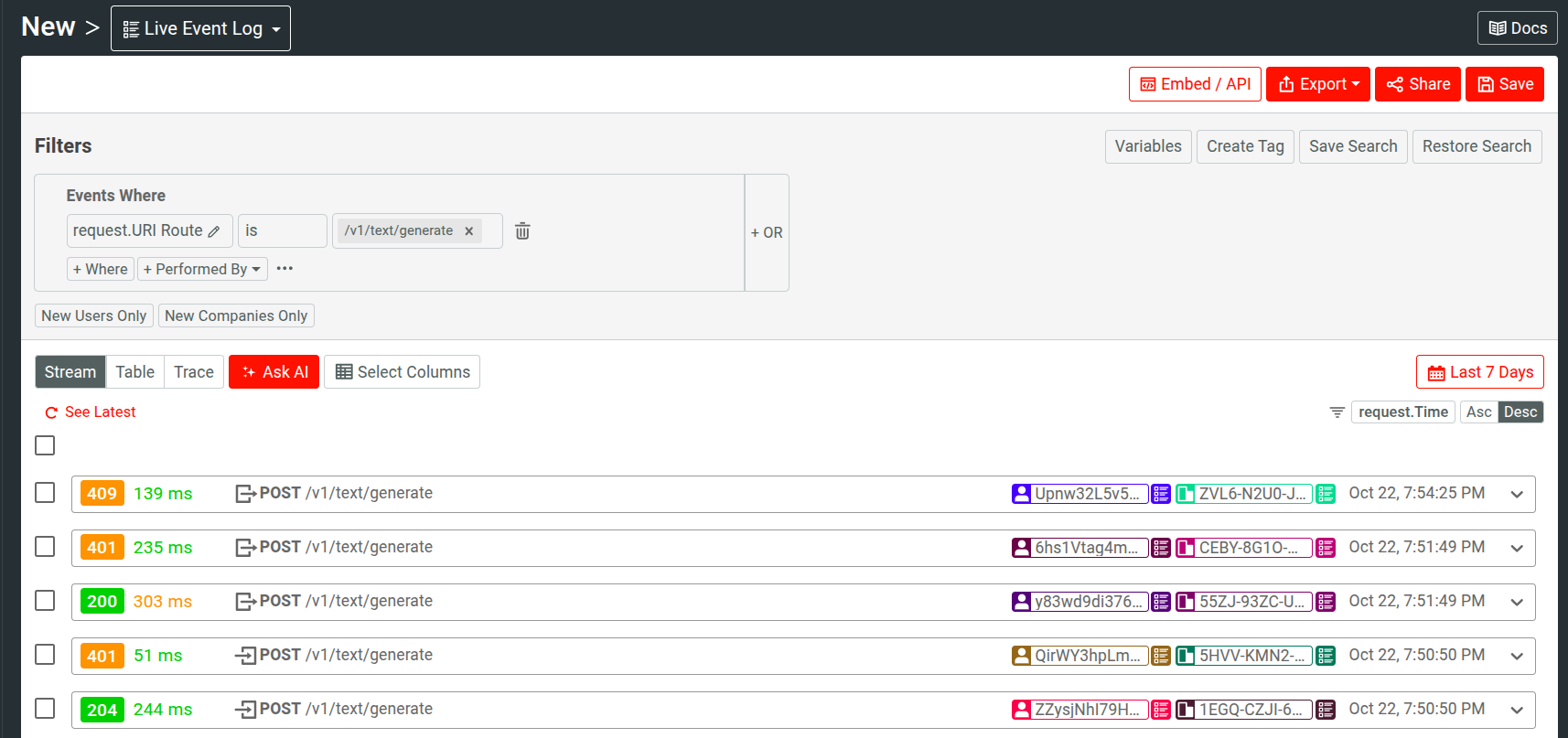
The Live Event Log in Moesif shows real-time API traffic; from here you can verify whether or not the events contain appropriate identification and attribution data.
Step 2: Create Plan and Optional Price
A billing meter in Moesif must have an associated plan and price to attribute the usage to. Use Moesif’s Product Catalog to define the financial model.
- The plan describes your internal pricing plan
- The price defines the usage rate; it can be flat or per-unit—for example, US$0.01 per 1,000 tokens
Even if your chargeback feeds into a custom billing system, defining plans and prices in Moesif helps maintain clean mapping.
Create a Plan
- Select Create New and then select Plan.
- Enter a name for the plan.
- Select Custom as the billing provider.
- In the External Plan Id field, you can enter the external plan ID from your custom billing solution.
- Choose a reporting schedule. It dictates how Moesif reports usage to your webhook.
- Enter an optional description and plan metadata.
- Select Create.
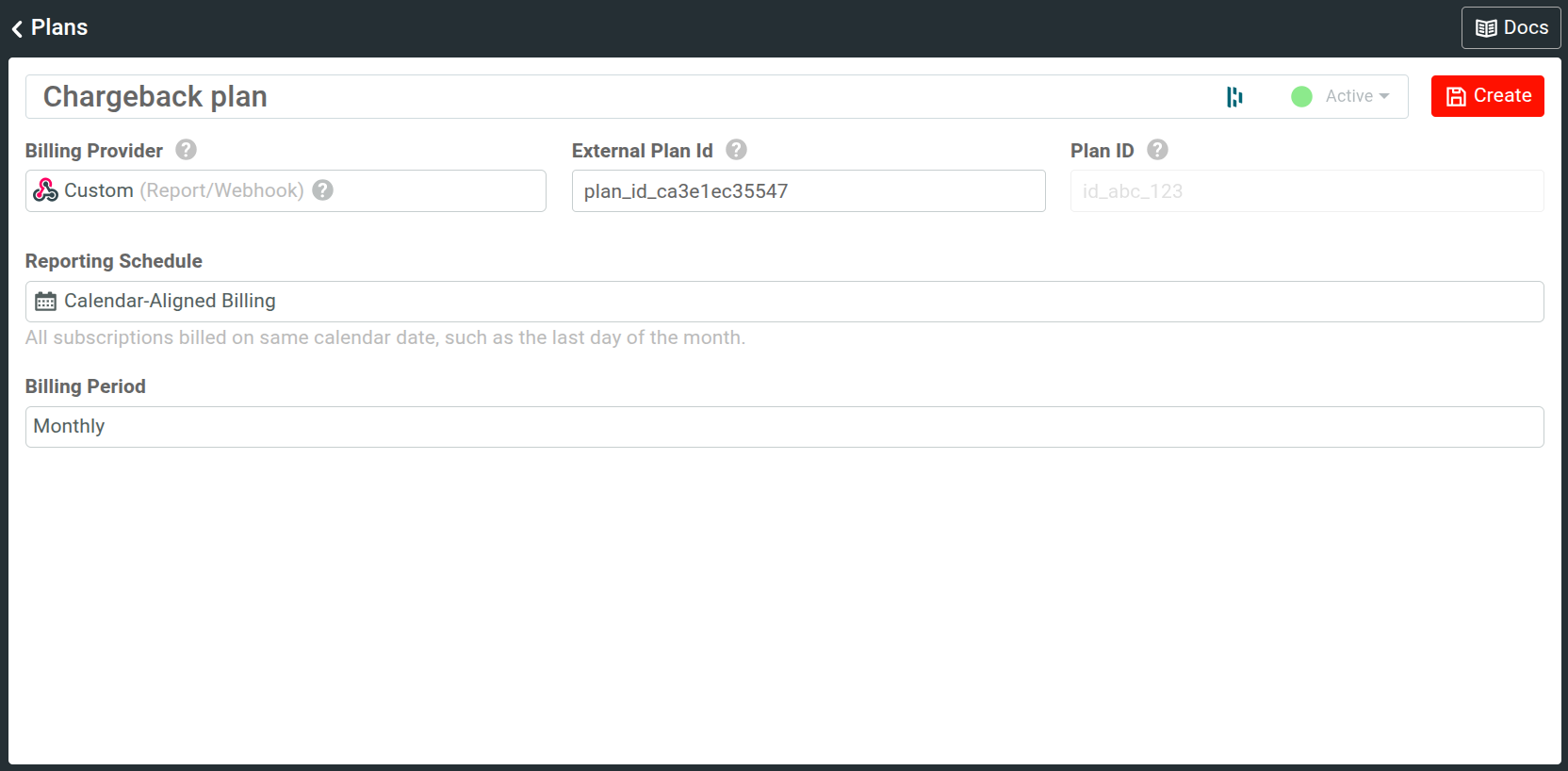
The following example shows a plan with calendar-aligned billing:
Create a Price (Optional)
- Select Create New and then select Price.
- Enter a name for the price.
- Link to the custom plan you created in the preceding step.
- Optionally, add price metadata.
- Define the pricing details:
- You can choose between usage-based and flat-rate pricing models.
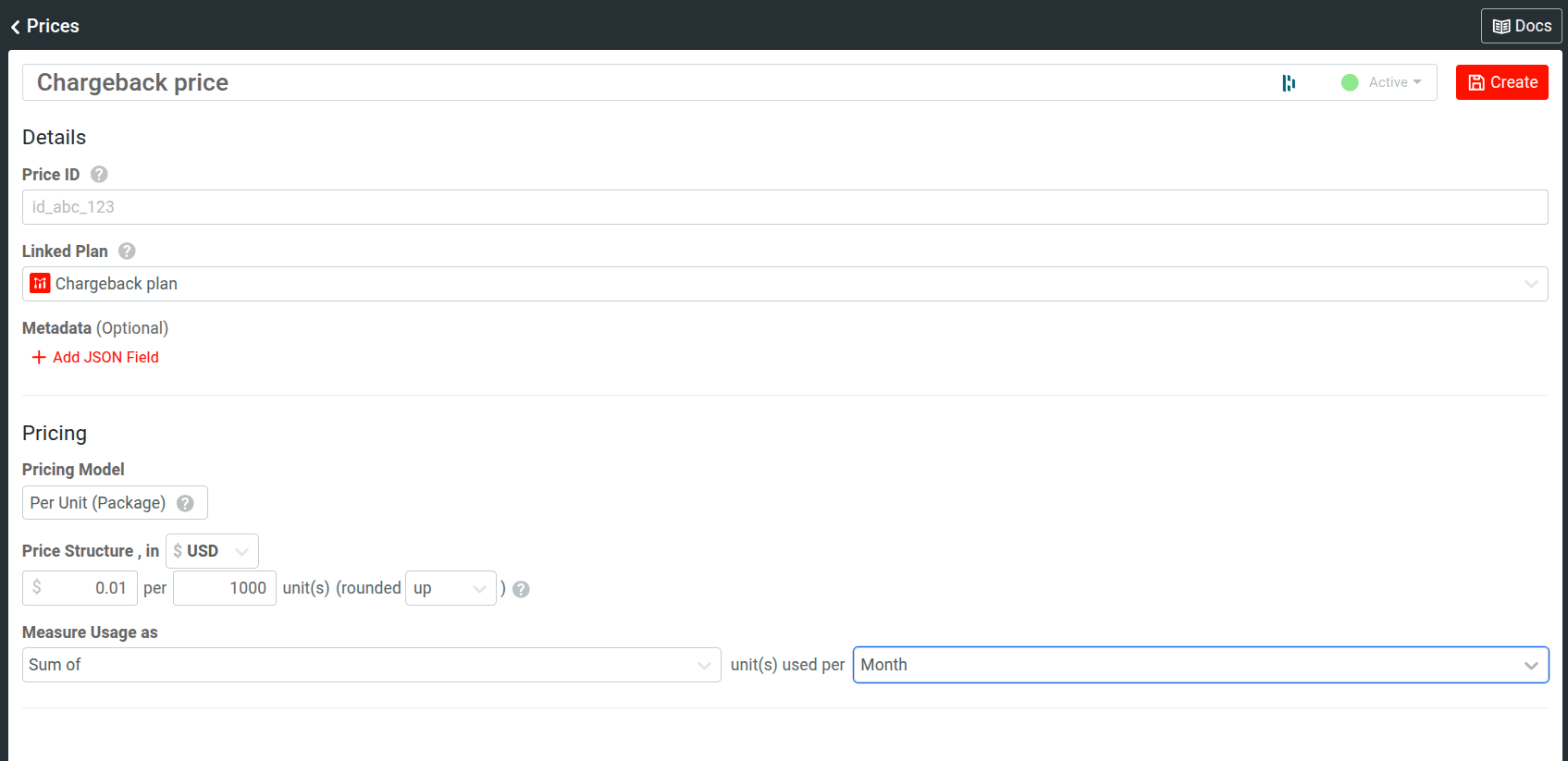
- For a usage-based model, specify the charged amount and the usage quantity.
- Define the usage calculation and aggregation method. For example, you may choose to sum up all consumed units in a month.
- Select Create.
Here’s an example price that charges 0.01 USD for each 1000 units of consumption:
Step 3: Create Billing Meter
After the preceding steps, you have instituted ownership and the cost semantics it entails. A billing meter connects these two by allowing you to define, track, and measure usage.
Moesif’s billing meters can define precise units of billable metrics, along dimensions that capture real cost drivers. For example:
- Total LLM tokens
- Input and output tokens
- Requests to premium models
- Compute-heavy endpoints
- Only successful
2xxresponses
Meters let you combine:
- Filters
- Custom metrics
- Scripted fields
- Multipliers—for example, US$0.01 per 1,000 tokens
This turns raw AI usage into financial quantity.
To create a billing meter, select Create New and then select Billing Meter. Then follow these steps:
Specify Billing Details
- Enter a name for the meter.
- Select Custom as the billing provider.
- Select your webhook. To create a new webhook, select Add New Webhook from the dropdown menu.
- Enter webhook name and URL.
- Select POST as the request method.
- (Recommended) Add a request header to authenticate requests coming from Moesif.
- Select Save.
- Select the custom plan and optional price for chargeback you created in the first two steps.
- Set the usage multiplier to match the number of units you’re charging for. Moesif multiplies the raw metered usage by this multiplier before calculating the billable quantity. The billing meter tracks every event. But since our example price charges for every 1000 units, we must set the usage multiplier to
0.001. - Optionally, set which direction Moesif should round the usage too to handle fractional or decimal usage values when usage multiplier is less than one.
- Select the subscription statuses the billing meter should track usage for.
Define Event Filters and Billable Metrics
- Define event filters in the Filters pane to specify which events to track and meter. For example, you may want to meter events for a specific API or endpoint and disregard error responses.
- In the Metrics pane, define the metric to charge for. In addition to predefined metric types, you can create custom metrics. If a field does not exist in your event data that you want to bill on, you can compute and create the field using Scripted Fields.
- Select Create to finish creating the meter.
Here’s an example of a billing meter. It defines a custom metric that charges for total token consumption for successful requests to two API endpoints.

Step 4: Create Subscription
To send usage data through the webhook, you must create a subscription for your internal customers, as in, the different teams of your organization. The following example shows a cURL command to Moesif’s /subscriptions API endpoint:
curl --request POST \
--url 'https://api.moesif.net/v1/subscriptions' \
--header 'X-Moesif-Application-Id: YOUR_COLLECTOR_APPLICATION_ID' \
--header 'Content-Type: application/json' \
--data '{
  "subscription_id": "UNIQUE_SUBSCRIPTION_ID",
  "company_id": "COMPANY_ID",
  "current_period_start": "2025-10-22T20:13:00.001Z",
  "current_period_end": "2026-10-21T20:13:00.001Z",
  "status": "active",
  "items": [
    {
      "plan_id": "MOESIF_PLAN_ID" <-- the GUID of the Moesif Plan
    }
  ]
}'
For more information about the subscription data, see the custom webhook setup and managing subscriptions docs.
Step 5: Connect with Internal Systems
Moesif sends a payload containing usage data to the webhook that looks like this:
{
  "idempotency_key":"KG5LxwFBepaKHyUD",
  "company_id":"J7F3-R9K1-T5B8",
  "subscription_id":"sub_a9e4bde6606e",
  "plan_id":"68f789d3596caf0b2f514306",
  "billing_meter_id":"68f8d856596caf0b2f51b123",
  "quantity":2,
  "start_time":"2025-10-01T00:00:00.000Z",
  "end_time":"2025-10-31T23:59:59.999Z"
}
The webhook can be a Lambda or internal microservice. It can then convert the payload into the internal schema and post to your billing system or internal APIs to carry out the rest of the chargeback process. Each record should include these details at the minimum:
- Department ID or equivalent. This maps to the webhook payload’s
company_id. - Billing period, mapping to the webhook payload’s
start_timeandend_time. - Usage quantity.
Finance systems can then aggregate and report these costs at the business-unit level. The teams use the same reports for budgeting.
Validate
Here are some validation steps to make sure everything functions as intended:
- Test your meter.
- Conduct a test billing cycle and observe the following:
- Usage data the webhook payload reports
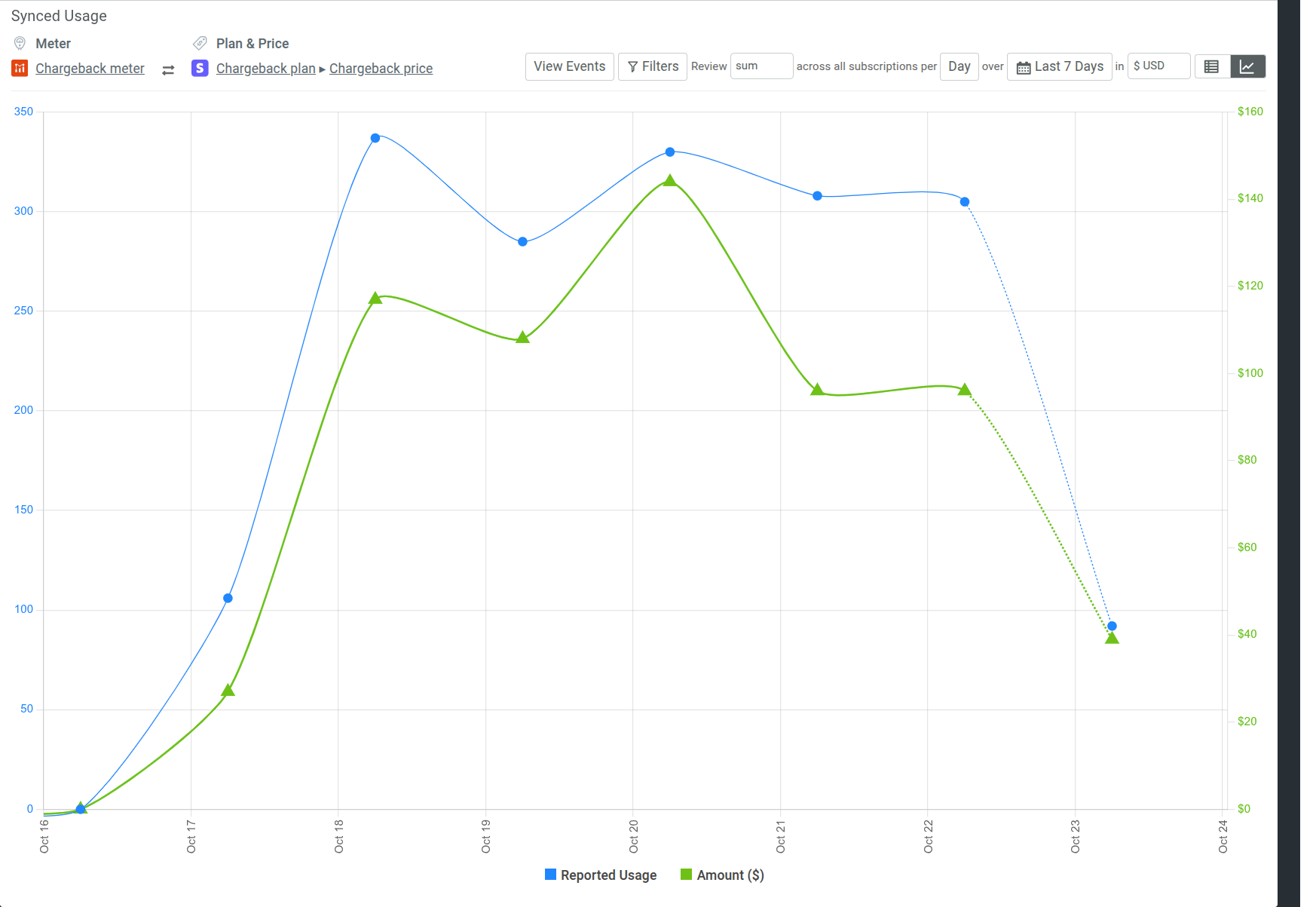
- Observe usage statistics with corresponding revenue in the Billing Meter’s Synced Usage pane. From that pane, you can also view the events associated with the usage.

- Make sure your internal systems correctly receive the data.
- Reconcile reported costs with vendor invoices.
Conclusion
As organizations grow their AI and API footprint, shared workloads become a significant, but often poorly understood cost center. Without attributing costs directly, budgets get strained, optimization stalls, and cost overruns become inevitable. Notwithstanding the business dimension, the infrastructure ceases to be a managed resource.
An internal chargeback model administers financial discipline so that:
- Usage becomes accountable
- Costs become explainable
- Teams become responsible consumers
- Finance and engineering align on real-time cost data
Using Moesif, you can implement this model with precision, leveraging the analytics you already collect to drive financial clarity, operational efficiency, and healthier organizational culture.

Related Articles

API Strategy
Leveraging AI For a Better API Strategy
Learn how to leverage AI to build and fortify your API strategy. Improve design, governance, documentation, and align APIs with business outcomes.
API Strategy
The 5 Best Mixpanel Alternatives of 2025
Learn about the best Mixpanel alternatives to determine the right analytics solution for your use case.

API Development
How to Leverage Moesif Effectively for API Observability
Effectively leverage Moesif for API observability through best practices for integration, event enrichment, custom actions, and engineering workflow integrat...
API Development
Introducing Moesif Basic Insights for WSO2 API Manager (APIM) and Bijira
Announcing Moesif Basic Insights for WSO2 API Manager and Bijira—a free, integrated, and AI-ready API analytics solution in WSO2.