Moesif JavaScript Browser SDK





The Moesif browser SDK enables you to identify users and track their website behavior to understand user journeys across your website and APIs together. This SDK also captures device context like geo location, browser version, marketing channel attribution, and UTM parameters.
You can use this client SDK alongside a Moesif server integration to monitor server-side API traffic. This enables you to track your end-to-end customer journey and build cross-platform funnel reports like your initial sign up to first API call conversion rate.
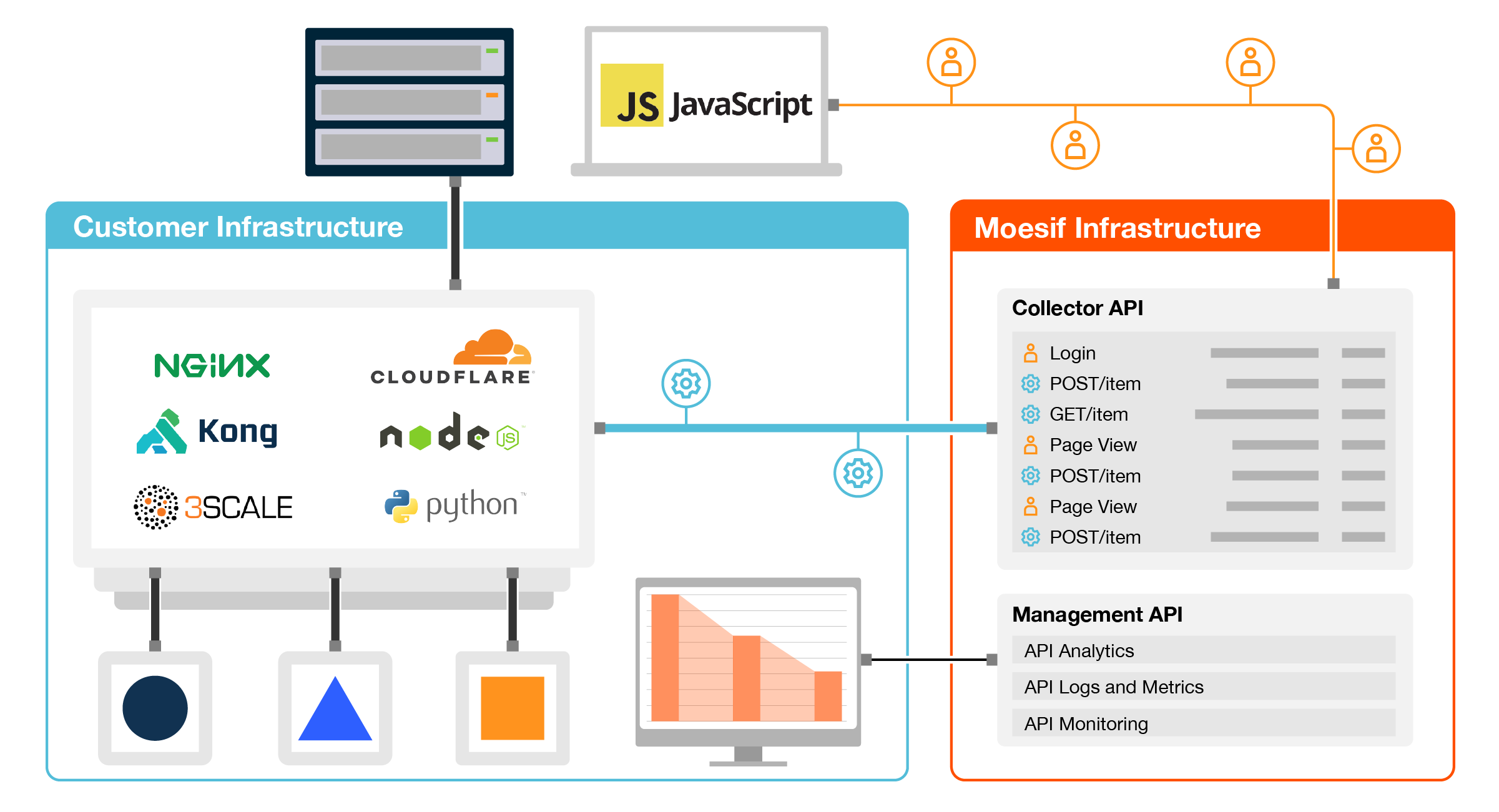
The SDK automatically collects useful context from a user’s device including any marketing attribution, device type, and location information and stores in the user and/or company profile in Moesif. You can add additional customer properties such as user email and company domain via the identifyUser() and identifyCompany() methods.
If you want to automatically log AJAX API calls, you can also call the start() method. API logging has native support for RESTful, GraphQL, Ethereum Web3, JSON-RPC, and other APIs
How to install
This SDK is designed to run in a browser. To monitor Node.js APIs, use moesif-nodejs.
Installation via script tag
<script src="//unpkg.com/moesif-browser-js@v1/moesif.min.js"></script>
<script type="text/javascript">
  // Initialize the SDK. Must be called before any other methods
  moesif.init({
    applicationId: "Your Publishable Moesif Application Id",
    // add other option here
  });

  // Identify the user with Moesif such as when user logs in
  moesif.identifyUser("12345");

  // Log user actions like clicked sign up. You can also pass in custom metadata.
  moesif.track("clicked_sign_up", {
    button_label: "Get Started",
  });
</script>
Put the above script tags in between the <head> tags of your HTML page.
It will attach a global moesif object. You can access it either via moesif or window.moesif.
Alternative installation via NPM
The SDK is also available on NPM which can be used if you’re using a front-end packager like Browserify or Webpack:
npm install --save moesif-browser-js
You can then require the lib like a standard NPM module:
var moesif = require("moesif-browser-js");
// or using the import syntax
// import moesif from "moesif-browser-js";

// Initialize the SDK. Must be called before any other methods
moesif.init({
  applicationId: "Your Publishable Moesif Application Id",
  // add other option here
});

// Identify the user with Moesif such as when user logs in
moesif.identifyUser("12345");

// Log UI actions like clicked sign up
moesif.track("clicked_sign_up", {
  button_label: "Get Started",
});
With the require method, the moesif object is not attached to any global scope, but you can attach to the global window object easily:
window.moesif = moesif;
Your Publishable Moesif Application Id will be displayed during the onboarding steps when signing up for Moesif when you select Browser JS. You can always find your Publishable Moesif Application Id at any time by logging into the Moesif Portal, go to the main menu, and then clicking Installation.
You should only use your publishable application id in untrusted apps like client-side javascript. This can be found by logging into Moesif and clicking API Keys from the bottom left menu.
How to use
Track user actions
Actions are something that a user (or company) performed on your website such as “Clicked Sign Up”, “Viewed Documentation”, or “Purchased a Plan”. Besides the action name, you can also save related metadata properties such as the “Sign Up Method” or “Button Label”.
// The first argument is required and contains the action name as a string.
// The second argument is optional and contains custom event metadata such as button label.
moesif.track('Clicked Sign Up', {
  button_label: 'Get Started',
  sign_up_method: 'Google SSO'
});
Moesif recommends starting with the following actions: “Viewed Landing”, “Viewed Docs”, “Account Created”, “Signed Up”, “Signed In”, “Invite Sent”, “Started Onboarding”, “Finished Onboarding”, “Trial Started”, and “Trial Ended”.
Identifying users
When you know the user’s id such as after sign in, call identifyUser.
This tells Moesif who the current user is so their actions can be linked to a user profile.
Besides the userId, you can also save related properties such as user demographics and subscription information.
moesif.identifyUser("12345", {
  email: "john@acmeinc.com",
  firstName: "John",
  lastName: "Doe",
  title: "Software Engineer",
  salesInfo: {
    stage: "Customer",
    lifetimeValue: 24000,
    accountOwner: "mary@contoso.com",
  },
});
Moesif recommends against calling identifyUser for anonymous users. Moesif will track these users automatically.
The recommended place to call identifyUser is after the user logs in and you know their real user id.
Identifying companies
In addition to identifying users, you can also identify the company for account level tracking. Besides the companyId, you can also save related properties such as company demographics and website domain.
// Only the first argument is a string containing the company id. This is the only required field.
// The second argument is a object used to store a company info like plan, MRR, and company demographics.
// The third argument is a string containing company website or email domain. If set, Moesif will enrich your profiles with publicly available info.
metadata = {
  orgName: "Acme, Inc",
  planName: "Free Plan",
  dealStage: "Lead",
  mrr: 24000,
  demographics: {
    alexaRanking: 500000,
    employeeCount: 47,
  },
};

moesif.identifyCompany("67890", metadata, "acmeinc.com");
If you call both identifyUser() and identifyCompany() in the same session, then Moesif will automatically associate the user with the company.
Track AJAX calls
If you want to automatically log AJAX API calls, you can do so via the start function.
// Start capturing AJAX API Calls.
moesif.start();
Anonymous Ids
When moesif-browser-js is initialized, an anonymousId is generated and stored for each new visitor.
This enables you to create funnel reports of anonymous visitors even before they have signed in
Once a user signs into your app, you should call identifyUser.
Moesif will automatically merge any previous user activity to the real userId, even if it’s a new device.
You should call
moesif.reset()when a user logs out of your application to ensure a new anonymousId is generated. Otherwise, new activity may get associated with an old user session.
You should only call identifyUser once a user logs into your app. Do not call identifyUser for anonymous visitors.
By default, Moesif uses both local storage and cookies for redundancy, but you can modify this behavior with the persistence options
Cross-Domain Tracking
By default, anonymous user sessions are scoped to a single domain (including sub-domains). If your product spans multiple domains (e.g., example.com and hello.world.dev), each domain gets its own independent anonymousId, making it impossible to stitch together the full user journey.
Cross-Domain Tracking (CDT) is an opt-in feature that passes the anonymousId between domains via a URL query parameter. When a user navigates from one domain to another, the SDK appends the current anonymousId to outgoing links. Upon arrival at the destination site, the SDK reads the parameter, persists the ID, and removes the parameter from the address bar to keep URLs clean.
For CDT to work end-to-end, both the origin domain and the destination domain must have
enableCrossDomainTracking: trueconfigured in theirmoesif.init()call.
Basic setup
moesif.init({
  applicationId: "Your Publishable Moesif Application Id",
  enableCrossDomainTracking: true,
  crossDomainTargets: null,             // null = decorate all cross-domain links
  // crossDomainTargets: ["site1.com", "site2.com"],  // or restrict to specific domains
  // crossDomainTrackingParameterName: '__mt',        // optional: customise the query param name (default: __mt)
});
Important: If
crossDomainTargetsis omitted entirely (i.e. not set), no cross-domain links will be decorated. You must explicitly set it tonull(all domains) or an array of target domains to activate URL decoration. This is intentional — it prevents unexpected behavior from silent defaults.
Configuration options
| Option | Type | Default | Description |
|---|---|---|---|
enableCrossDomainTracking |
boolean | false |
Enables or disables Cross-Domain Tracking. |
crossDomainTargets |
null | string[] |
(unset — no decoration) | null decorates all cross-domain links. An array restricts decoration to only those domains. If the option is not set, no links are decorated. |
crossDomainTrackingParameterName |
string | __mt |
The URL query parameter name used to carry the anonymousId. |
Automatically intercepted navigations
When CDT is enabled, the SDK automatically decorates outgoing URLs for the following navigation methods:
- Anchor tags (
<a href="...">) — standard clicks, middle-clicks, touch events, and “Copy Link Address” via the context menu. - Form submissions — GET method only. POST form actions are not decorated.
Manual URL decoration
Some navigation methods cannot be intercepted automatically (e.g., window.location.href, window.location.assign(), window.location.replace(), window.open(), and the Navigation API). For these cases, the SDK exposes a helper:
moesif.cdtUrlDecorator(targetURL, overrideCDTTargets = false)
This function appends the current anonymousId and the configured parameter name to the given URL. If the URL is already decorated, the existing parameter value is updated. If the target domain is not in crossDomainTargets, the URL is returned unchanged — unless overrideCDTTargets is set to true.
Example usage:
// Anchor tags are handled automatically. For JS-based redirects, wrap the URL manually:

// window.location.href
window.location.href = moesif.cdtUrlDecorator('https://console.bijira.dev/signup');

// window.location.assign
window.location.assign(moesif.cdtUrlDecorator('https://console.bijira.dev/signup'));

// window.location.replace
window.location.replace(moesif.cdtUrlDecorator('https://console.bijira.dev/signup'));

// window.open
window.open(moesif.cdtUrlDecorator('https://console.bijira.dev/signup'));

// Navigation API
navigation.navigate(moesif.cdtUrlDecorator('https://console.bijira.dev/signup'));

// Force-decorate a URL regardless of crossDomainTargets
const url = moesif.cdtUrlDecorator('https://other-domain.com/page', true);
A convenience wrapper pattern if moesif may not yet be initialised:
function decorateMoesifCdtUrl(url) {
  if (moesif) {
    return moesif.cdtUrlDecorator(url);
  }
  return url;
}
How it works
- User visits
site-a.com— the SDK generates and stores ananonymousId. - User clicks a link to
site-b.com— the SDK appends?__mt=<anonymousId>to the URL. - User lands on
site-b.com— the SDK reads__mt, persists the sameanonymousId, and removes the parameter from the address bar. - Both sites now share the same
anonymousId, so all actions across both domains are stitched into one continuous user journey in Moesif.
Same-domain links are never decorated — URL decoration only occurs when the destination is a different domain than the current page.
Consent Management
The Moesif SDK provides flexible consent management options to help you comply with privacy regulations like GDPR and CCPA. The SDK distinguishes between consent to store data locally and consent to publish data to Moesif servers.
Important: Cookies Created on Init
⚠️ Cookies and localStorage may be created as soon as the SDK is initialized (init()), regardless of the user’s consent status.
If your compliance requirements mandate that no cookies or storage are created before consent is obtained, you must:
- Defer SDK initialization until after the user grants consent
- Call
moesif.init()only after consent is granted
This is the recommended approach for strict “consent-first” implementations where no tracking data can be stored locally before user consent.
Consent for Publishing (requirePublishingConsent)
If you want to track user actions locally without sending data to Moesif until consent is granted, use the requirePublishingConsent option. This approach allows you to:
- Track all user actions and API calls without any loss of data
- Store tracked events locally in a queue (persisted to localStorage only, NOT cookies)
- Automatically flush the queue to Moesif when consent is granted
- Continue tracking seamlessly across page refreshes (when using default
localStoragepersistence mode)
This is ideal when you want zero data loss while still respecting user privacy - all events are tracked locally and sent to Moesif only after the user explicitly consents.
How It Works
When requirePublishingConsent: true is set:
- Before Consent:
- All
track()calls,identifyUser(),identifyCompany(), and API events are queued locally - Queue is persisted to localStorage only (not on cookies) and survives page refreshes
- Note: If
persistence: 'cookie'mode is used, the queue will NOT persist across page refreshes (in-memory only) - Cross-domain tracking links are NOT decorated (no anonymousId in URLs)
- Queue follows FIFO (First-In-First-Out) - oldest events dropped when limit reached
- All
- After
grantPublishingConsent()is called:- All queued events are immediately sent to Moesif
- Local queue is cleared after successful delivery
- Future events are sent to Moesif immediately
- Cross-domain tracking links are decorated with anonymousId
- After
revokePublishingConsent()is called:- Consent state is revoked
- Any queued events are cleared
- New events start queuing locally again
- Recording Control with
start()andstop():- These methods work the same way as described in their respective documentation, the only difference is when consent is not granted, events are queued up locally instead of being sent immediately to Moesif.
- See
start()andstop()for full details Refer API Methods for details on each methods.
State Management: Developer Responsibility
⚠️ Important: The SDK does NOT persist the following states:
- Whether
init()has been called - Whether consent has been granted via
grantPublishingConsent()
You (the developer) are responsible for:
- Managing initialization state - Track whether you’ve called
init() - Managing consent state - Store the user’s consent decision in your own storage
- Restoring state on page load - Check your stored consent state and call
grantPublishingConsent()if needed
Example: State Management Implementation
// On page load
document.addEventListener('DOMContentLoaded', function() {
  // Initialize SDK (this creates cookies/localStorage)
  moesif.init({
    applicationId: 'Your Publishable Moesif Application Id',
    requirePublishingConsent: true
  });

  // Check your stored consent state (example using localStorage)
  const hasConsented = localStorage.getItem('user_tracking_consent') === 'granted';

  if (hasConsented) {
    // User previously granted consent, restore it
    moesif.grantPublishingConsent();
  }

  // Start tracking API calls and user actions
  moesif.start();
});

// When user grants consent
function handleConsentAccepted() {
  // Store consent decision in YOUR storage
  localStorage.setItem('user_tracking_consent', 'granted');

  // Grant consent in Moesif SDK
  moesif.grantPublishingConsent();
}

// When user revokes consent
function handleConsentRevoked() {
  // Update consent decision in YOUR storage
  localStorage.setItem('user_tracking_consent', 'revoked');

  // Revoke consent in Moesif SDK
  moesif.revokePublishingConsent();
}
Example: Complete Consent Flow
// 1. Initialize with consent required
moesif.init({
  applicationId: 'Your Publishable Moesif Application Id',
  requirePublishingConsent: true,
  maxQueueSize: 1000
});

// 2. Start recording (events will be queued, not sent)
moesif.start();

// 3. Track events (queued locally)
moesif.track('viewed_homepage');
moesif.identifyUser('user_123');

// 4. When user grants consent
moesif.grantPublishingConsent();
// Now all queued events are sent to Moesif

// 5. Continue tracking (sent immediately)
moesif.track('clicked_cta');

// 6. If user later revokes consent
moesif.revokePublishingConsent();
// Future events will be queued again (not sent)
Strict Compliance Mode: Defer Init Until Consent
For strict compliance where no cookies or storage can be created before consent:
// Wait for user consent before initializing
document.addEventListener('DOMContentLoaded', function() {
  // Check if user has already granted consent
  const hasConsented = localStorage.getItem('user_tracking_consent') === 'granted';

  if (hasConsented) {
    // User previously consented, safe to initialize
    initializeMoesif();
  } else {
    // Show consent banner
    showConsentBanner();
  }
});

function initializeMoesif() {
  moesif.init({
    applicationId: 'Your Publishable Moesif Application Id'
  });
  moesif.start();

  // Track events immediately (they go to Moesif right away)
  moesif.track('session_started');
}

function handleConsentAccepted() {
  localStorage.setItem('user_tracking_consent', 'granted');
  initializeMoesif(); // Initialize only after consent
  hideConsentBanner();
}
List of Methods on the moesif Object
init, (obj) => null
Initialize the SDK with your Publishable Application Id and any other options.
On initialization, the SDK will capture user context like device and marketing attribution.
This method must be called before any other methods like start() or identifyUser.
var options = {
  applicationId: 'Your Publishable Moesif Application Id'
};

moesif.init(options);
identifyUser, (string, object) => null
When a user logs into your website and you have their actual user id, identify the user with your userId. You can also add custom metadata containing fields like the customer’s name and email as the second argument.
Note: You shouldn’t call identifyUser for anonymous visitors to your website.
Moesif automatically assigns them an anonymousId, so just calling track works just fine without identify.
When you call identifyUser, Moesif automatically merges the anonymousId with your real userId.
moesif.identifyUser("12345", metadata);
identifyCompany, (string, object, string) => null
Similar to identifyUser, but for tracking companies (accounts) which is recommended for B2B companies.
You can use both identifyUser and identifyCompany or just one. If you call both identifyUser() and identifyCompany() in the same session, then Moesif will automatically associate the user with the company.
Only the first argument is a string containing the company id. This is the only required field. The second argument is a object used to store a company info like plan, MRR, and company demographics. The third argument is a string containing company website or email domain. If set, Moesif will enrich your profiles with publicly available info.
moesif.identifyCompany("67890", metadata, "acmeinc.com");
track, (string, object) => null
Track user actions such as “clicked sign up” or “made a purchase”. By tracking user actions in addition to API usage via one of the Moesif server SDKs, you’ll be able to understand the entire customer journey from initial sign up to first API call. First argument is an action name as a string, which is required. Second parameter is an optional metadata object related to this action event. See API Reference
moesif.track('clicked_sign_up', {
  button_label: 'Get Started'
});
identifySession, (string) => null
The Moesif SDK tracks browser sessions automatically and saves in a Cookie. You can override with a specific session token.
The new session token will continue to be used until identifySession is called again.
moesif.identifySession("d23xdefc3ijhcv93hf4h38f90h43f");
reset, () => null
Clears any saved userId, companyId, and any other device context like anonymousId.
You must call reset() when a user logs out of your web app which will force the SDK to generate a new anonymousId.
This ensures a new anonymous id is generated and ensuring different sessions are not mixed up.
This is especially important for testing if you are logging into multiple accounts from the same device.
moesif.reset()
start, () => null
In addition to tracking user actions, the SDK can also log outgoing API calls.
When you call start(), the SDK will log AJAX API calls, including:
- Your own APIs (such as an API powering your Single Page App)
- 3rd party APIs (such as to Stripe and Twilio)
- Decentralized APIs such as DApps communicating with Ethereum Web3/interactions with smart contracts
moesif.start()
stop, () => null
Stops logging AJAX API calls. It is not required to call this, since recording will stop automatically when the browser tab is closed.
However, you can call stop directly if you want more control. Call start again to restart API logging.
moesif.stop()
cdtUrlDecorator, (string, boolean) => string
Manually decorates a URL with the current anonymousId for use with navigation methods that cannot be intercepted automatically (e.g., window.location.href, window.open()). Requires enableCrossDomainTracking: true in init().
The second argument overrideCDTTargets (default false) forces decoration even if the target domain is not in crossDomainTargets.
Returns the decorated URL as a string. If the target domain is not allowed and overrideCDTTargets is false, the original URL is returned unchanged.
const decoratedUrl = moesif.cdtUrlDecorator('https://console.bijira.dev/signup');
window.location.href = decoratedUrl;
useWeb3, (web3) => boolean
Sets the web3 JSON-RPC to use the web3 object passed in. If no argument is passed
in, it will try to restart capturing using the global web3 object. Return true if successful.
moesif.useWeb3(myWeb3Object);
grantPublishingConsent, () => void
Call this method when the user grants consent to send data to Moesif. This will:
- Flush all queued events to Moesif servers
- Clear the local queue after successful delivery
- Allow future events to be sent immediately
// When user clicks "Accept Cookies" or "Accept Tracking"
moesif.grantPublishingConsent();
Refer Consent Management more details.
revokePublishingConsent, () => void
Call this method when the user revokes consent. This will:
- Stop sending new events to Moesif
- Clear any queued events
- Start queuing new events locally again (if recording is active)
// When user clicks "Revoke Consent" or "Opt Out"
moesif.revokePublishingConsent();
Refer Consent Management more details.
isPublishingConsentGranted, () => boolean
Returns true if consent to publish has been granted, false otherwise.
if (moesif.isPublishingConsentGranted()) {
  console.log('User has granted consent to publish data');
} else {
  console.log('User has not granted consent yet');
}
Refer Consent Management more details.
Configuration options
The options is an object that is passed into the SDK’s init method.
applicationId - string, required
This is the collector API key that is obtained from your Moesif account. You should only use your publishable application id in untrusted apps like client-side javascript. Publishable Collector Application Id’s are write-only keys and can be safely used on the client side.
enableCrossDomainTracking, boolean, optional, default false
Enables Cross-Domain Tracking (CDT). When true, the SDK will automatically decorate outgoing cross-domain anchor links and GET form submissions with the current anonymousId. Use cdtUrlDecorator() for JS-based navigations that cannot be intercepted automatically.
Both the origin and destination sites must have this option enabled for tracking to be stitched together correctly.
crossDomainTargets, null | string[], optional, default: unset (no decoration)
Controls which destination domains will have their URLs decorated with the anonymousId.
null— decorate all outgoing cross-domain links.["domain-a.com", "domain-b.com"]— only decorate links pointing to the listed domains.- Unset (not provided) — no cross-domain links are decorated. You must explicitly set this option to
nullor a non-empty array to activate URL decoration.
crossDomainTrackingParameterName, string, optional, default __mt
The URL query parameter name used to carry the anonymousId between domains. Override this if __mt conflicts with an existing parameter in your application.
batchEnabled, boolean, optional, default false.
Will start batching the tracking of API Events and User Actions to sent to Moesif. The identifyUser and identifyCompanies are not batched.
batchSize, number, optional, default 25
Even if set, the batchSize is used on a best effort basis. If the payloads sizes get too big, the batchSize maybe auto adjusted.
batchMaxTime, number in milliseconds, optional, default 2500
The maximum interval to flush the queue when the batch size have not been reached.
eagerBodyLogging, boolean, optional, default false
Some complex frameworks like Angular monkey patch to intercept the response body. If you are an Angular user or find that the response is not being captured, turn this option on to eagerly capture the response info.
persistence, string, optional, default localStorage
The allowed values are localStorage, cookie, and none.
Moesif saves session info like anonymous ids and identified ids to a device’s storage to accurately track returning visitors even if they haven’t signed in.
-
When set to
localStorage(the default setting), will write session info to localStorage and then replicate to a cookie for redundancy. This ensures that if the user clears local storage or visits a different subdomain (like fromdocs.acmeinc.comtoacmeinc.com), there is still a cookie to fall back to and the user can be accurately attributed. This setting is recommended for most applications. -
When set to
cookie, session info and anonymous ids is persisted to cookies only. No local storage is used. Note: If you’re using therequirePublishingConsentfeature, the pending events queue will NOT persist across page refreshes in this mode (stored in-memory only). -
When set to
none, nothing will be persisted. Not recommended except for advanced use cases or testing. Refreshing the browser tab will create a new user session. Note: The pending events queue (when usingrequirePublishingConsent) will also not persist across page refreshes in this mode.
Keep in mind if a user clears both their cookies and their local storage, then a new anonymousId will be generated,
As long as you called identifyUser before the data was cleared, Moesif will still merge the two sessions.
crossSiteCookie, boolean, optional, default false,
This enables cross-site requests by adding SameSite=None; Secure to the cookie.
This is used for special situation such as if your application is embedded in an iframe.
When enabled,
secureCookieis forced to true due to modern browser requirements.
crossSubdomainCookie, boolean, optional, default true,
When true, the cookie domain will also allow all subdomains of your hostname. This is usually recommended to track anonymous users across multiple
properties like https://www.acmeinc.com vs https://docs.acmeinc.com.
cookieExpiration, number, optional, default 365
Set the cookie expiration in days. By default this is 365 days.
secureCookie, boolean, optional, default false,
If set to true, the cookie can only be read on https:// websites.
cookieDomain, string, optional, default ‘’
To override the domain of the cookie, you can set this such as to *.acmeinc.com
persistenceKeyPrefix, string, optional, default moesif_
The keys used for saving into local storage and cookies start with moesif_. You can override the prefix such as if you’re running multiple instances of moesif-browser-js.
disableFetch, boolean, optional, default false.
Starting from version 1.4.0, this SDK also instruments fetch API if it is not polyfilled.
Some browsers may use fetch under XmlHTTPRequest, then it is possible events get duplicated. In this case, disable fetch will fix the issue.
skip, (event) => boolean, optional
A function hook that will skip logging the event to Moesif if returns true. The parameter passed in is an event model. See event model.
High volume APIs can reduce cost tremendously by leveraging dynamic sampling to set rules without any code change or restarts. Moesif will still extrapolate original metrics so your reporting is accurate.
maskContent, (event) => event, optional
A function hook that enables you to mask any sensitive data in the event model. Your custom code must return the same event, after applying any masking.
For super sensitive data, Moesif recommends leveraging zero-knowledge security with on-premises client-side encryption and bring your own keys (BYOK).
getMetadata, (event) => object, optional
Function that allow you to append arbitrary JSON metadata to API calls before being logged to Moesif.
host, string, optional
defaults to api.moesif.net. If you are using a proxy to send data to Moesif, please set the the host to proxy.yourcompany.com.
full options example:
var options = {
  applicationId: "Your Publishable Moesif Application Id",
  skip: function (event) {
    if (event.request.uri.includes("google")) {
      return true;
    }
    return false;
  },
  maskContent: function (event) {
    if (event.request.headers["secret"]) {
      event.request.headers["secret"] = "";
    }
    return event;
  },
  getMetadata: function (event) {
    if (event.request.uri.includes("stripe")) {
      return {
        type: "payment",
      };
    }
  },
  host: 'proxy.acmeinc.com'
};

moesif.init(options);
requirePublishingConsent, boolean, optional, default false
When set to true, the SDK will queue all tracking events locally instead of sending them to Moesif. Events remain queued until grantPublishingConsent() is called.
moesif.init({
  applicationId: 'Your Publishable Moesif Application Id',
  requirePublishingConsent: true, // Queue events locally until consent is granted
  maxQueueSize: 1000 // Optional: Set queue size limit
});
maxQueueSize, number, optional, default 1000
The maximum number of events that can be queued locally before consent is granted. When the queue reaches this limit:
- The oldest event is dropped (FIFO queue)
- The newest event is added to the queue
This prevents unbounded memory growth if a user never grants consent.
moesif.init({
  applicationId: 'Your Publishable Moesif Application Id',
  requirePublishingConsent: true,
  maxQueueSize: 500 // Limit queue to 500 events
});
Ethereum DApp support
DApps (Decentralized Apps) are frontend apps which interact with blockchains such as Ethereum over an API like any other Single Page App. For Ethereum, this API layer uses JSON-RPC and is called the Ethereum Web3 API which Moesif supports natively.
Moesif will capture interactions with the Ethereum blockchain just like any other API to understand usage and monitor for any issues affecting your Dapp. Because this data is binary, there are additional set up steps needed to convert these API interactions into something human readable. Checkout Moesif’s Ethereum Web3 documentation for more info.
There is also a tutorial available on Building an Ethereum DApp with Integrated Web3 Monitoring.
Web3 object
Many Dapp clients such as the Metamask extension and Mist Browser, will inject a web3 object directly in the browser’s global scope.
The default moesif-browser-js config will automatically instrument the injected web3 object and capture outgoing API transactions to the Ethereum network.
For advanced scenarios where your code uses a different web3 object than the default one, you can call moesif.useWeb3(myWeb3) to ensure the correct web3 instance is instrumented.
The web3 object can change if you let users modify the selected web3 provider or change their network. An example is below:
if (typeof web3 !== "undefined") {
  myWeb3 = new Web3(web3.currentProvider);
  // No action needed by Moesif
} else {
  // set the custom provider you want from Web3.providers
  myWeb3 = new Web3(new Web3.providers.HttpProvider("http://localhost:8545"));

  moesif.useWeb3(myWeb3);
}
Troubleshooting
Response not being logged
Certain frameworks like Angular monkey patch the XMLHttpRequest heavily. In these cases, enable the eagerBodyLogging option to eagerly capture the response info.
Incorrect user tracking
If you see inaccuracies with your customer funnel such as user actions being associated to the wrong user, ensure you are calling moesif.reset() when a user logs out of your application. Without this step, Moesif has no knowledge that the user logged out and will continue to associate activity to the old user even if a new user logs into the same device/browser.
Duplicate API events
By default, moesif-browser-js captures both outgoing API calls from XMLHttpRequest and the web3 object.
This way you can see both blockchain related transactions along with other 3rd party APIs like Twilio or Stripe.
If the Web3 provider is also using the XMLHttpRequest (such as the HttpProvider), it’s possible that the same API call is captured twice. This is expected.
moesif-browser-js adds metadata depending on the captured source. For events that are captured via web3, we add additional event metadata for the web3 provider used.
As an example:
{
  "_web3": {
    "via_web3_provider": true,
    "is_metamask": true
  }
}
Cross-domain tracking not working
- Confirm
enableCrossDomainTracking: trueis set inmoesif.init()on both the origin and destination domains. - Confirm
crossDomainTargetsis explicitly set tonull(all domains) or an array containing the destination domain. If the option is omitted, no URL decoration will occur. - For JS-based navigations (
window.location.href,window.open(), etc.), ensure you are wrapping the target URL withmoesif.cdtUrlDecorator()before navigating. These methods cannot be intercepted automatically. - POST form submissions are not decorated. Use a GET form or a JS-based redirect with
cdtUrlDecorator()instead. - Check whether a privacy-focused browser extension is stripping the
__mtquery parameter. You can customise the parameter name viacrossDomainTrackingParameterNameto avoid conflicts with known filter lists.
Examples
- Several examples for how to import this library are in the example folder of this repo, moesif-min folder have more examples usage.
- Example setup for react-boilerplate. For React apps, if you set up server-side rendering, please ensure that this library is only initiated on the client-side.
- Example setup for an Etherum Dapp.
Credits for moesif-browser-js
Some of the build scripts, utilities, and directory structure is based on Mixpanel’s Javascript Client Library, which is under Apache 2.0 license.
Some utilities are based on underscore.
To modify and build this library, please see instructions in Build.md
Note, this library has ZERO external dependencies (only have dev dependencies or dependencies for some of the examples).
Other integrations
To view more more documentation on integration options, please visit the Integration Options Documentation.