Analyze Agent-to-Agent (A2A) Protocol Traffic in Moesif
Overview
In this tutorial, you’ll learn how to send Agent-to-Agent (A2A) protocol events to Moesif and analyze them. You send sample events that cover different transports, operations, and outcomes. Then you use them to answer questions about how your agents behave.
This tutorial is for platform engineers, gateway and SDK developers, and product teams who run AI agents that communicate over the A2A protocol. It assumes you have basic knowledge of the following:
- API events in Moesif
- JSON and making HTTP requests from the command line
- The core concepts of the A2A protocol: agents, messages, tasks, and contexts
By the end of this tutorial, you’ll be able to perform the following:
- Send A2A events to Moesif.
- Group A2A traffic by agent, operation, and outcome.
- Find failed calls and the party responsible for each failure.
- Measure how quickly streaming agents respond.
- Follow a single A2A conversation across multiple calls.
Background
A2A Analytics lets you analyze A2A protocol traffic in Moesif. To mark an event as an A2A call, you add an a2a object to the event. Moesif makes the fields of this object available under the A2A Analytics filter.
In this tutorial, you send sample A2A events directly to the Moesif Collector API. This way, you can see exactly what Moesif receives, without setting up any agents. For other ways to send A2A events, see A2A Analytics. That page also explains each field in the a2a object.
Before You Start
Before you start the tutorial, make sure you have the following:
- A Moesif account. If you don’t have one, sign up for free.
- Your Moesif Application ID. To get it, follow these steps:
- Log into Moesif Portal.
- Select the account icon to bring up the settings menu.
- Select Installation or API Keys.
- Copy your Moesif Application ID from the Collector Application ID field.
curland Python 3.8 or later. The Python script in this tutorial uses only the standard library. You don’t need to install any packages.
If your Moesif organization uses the EU region, replace api.moesif.net with eu.api.moesif.net in every command in this tutorial. For more information, see Data Residency.
Send A2A Events to Moesif
To get started, save your Application ID in an environment variable so that you can reuse it in the following commands:
export MOESIF_APPLICATION_ID='Your Moesif Application ID'
-
Send your first A2A event.
The following command sends one event that describes a
SendMessagecall over JSON-RPC. A user asks a weather agent about the weather. The agent replies with a completed task. The command uses the current time so that the event appears at the top of your event log.# Use the current UTC time for the request and response timestamps NOW=$(date -u +%Y-%m-%dT%H:%M:%S) curl -i -X POST https://api.moesif.net/v1/events \ -H "Content-Type: application/json" \ -H "X-Moesif-Application-Id: $MOESIF_APPLICATION_ID" \ -d @- <<EOF { "request": { "time": "${NOW}.100Z", "uri": "https://weather-agent.example.com/", "verb": "POST", "headers": {"content-type": "application/json"}, "body": { "jsonrpc": "2.0", "id": "req-001", "method": "SendMessage", "params": { "message": { "kind": "message", "messageId": "m-001", "role": "user", "parts": [{"kind": "text", "text": "What is the weather in Colombo?"}] }, "configuration": {"blocking": true} } } }, "response": { "time": "${NOW}.900Z", "status": 200, "headers": {"content-type": "application/json"}, "body": { "jsonrpc": "2.0", "id": "req-001", "result": { "kind": "task", "id": "t-a1b2c3", "contextId": "c-xyz-1", "status": { "state": "TASK_STATE_COMPLETED", "message": { "kind": "message", "messageId": "m-agent-reply-001", "role": "agent", "parts": [{"kind": "text", "text": "Weather in Colombo: 28°C, humid, chance of rain."}] } } } } }, "direction": "Incoming", "user_id": "alice@example.com", "a2a": { "operation": "SendMessage", "transport": "JSONRPC", "protocol_version": "1.0", "agentId": "weatheragent2", "agentName": "Weather Agent v2", "request_type": "operation", "request": { "message_id": "m-001", "input_part_count": 1, "return_immediately": false }, "response": { "is_error": false, "is_streaming": false, "payload_type": "task", "task_id": "t-a1b2c3", "context_id": "c-xyz-1", "task_state": "TASK_STATE_COMPLETED" }, "terminal": true, "outcome": "SUCCESS" } } EOFThe
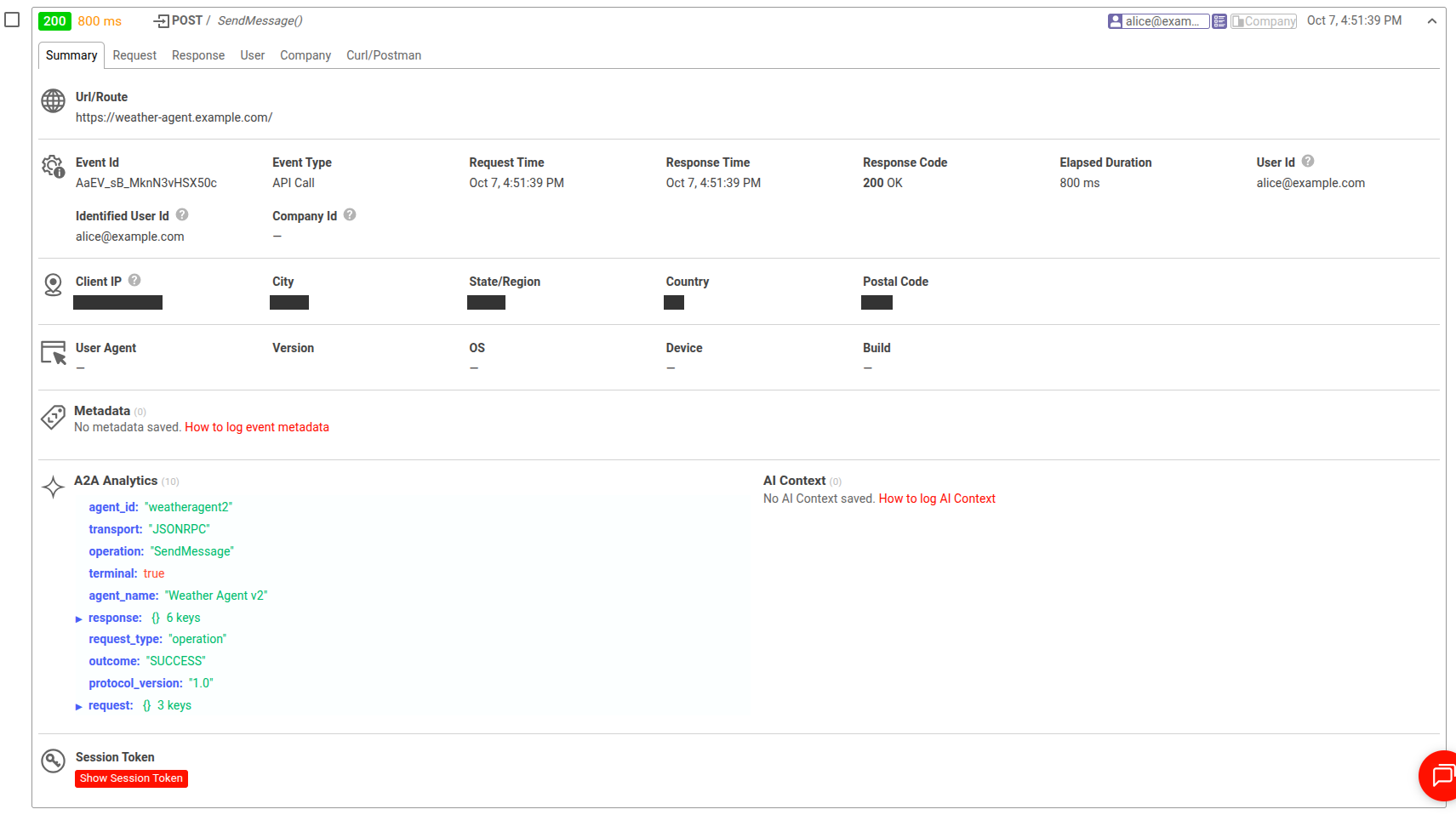
requestandresponseobjects hold the raw HTTP exchange. Thea2aobject summarizes the call at the protocol level. Note the following fields:operationandtransport: The client callsSendMessageover JSON-RPC.agentIdandagentName: The call goes to Weather Agent v2.response.task_idandresponse.context_id: The agent creates taskt-a1b2c3in conversationc-xyz-1.terminalandoutcome: The task reaches a final state. The call succeeds.
Moesif responds with an HTTP
201 Createdstatus code. If Moesif rejects the event, check the validation rules in A2A Analytics Filters. -
Confirm that Moesif received the event.
a. In Moesif Portal, open the Live Event Log.
b. Select the event for
POST https://weather-agent.example.com/to open its details.The event details show the A2A fields inside A2A Analytics alongside the request and response data of the event.
The following shows the A2A fields of a
SendMessageevent in the Live Event Log:
-
Send a batch of A2A events that cover different scenarios.
The following Python script sends five more events in one request to the batch endpoint. Each event represents a different situation. In the next section, you’ll explore these scenarios in more detail.
- Event 1: The Travel Planner Agent receives a
SendStreamingMessagecall over JSON-RPC. The agent streams status updates and completes the task. - Event 2: The Travel Planner Agent receives a
GetTaskcall over HTTP+JSON. The client fetches the same task later, in the same context. - Event 3: Weather Agent v2 receives a
SendMessagecall over JSON-RPC. The call succeeds. However, the task fails inside the agent. - Event 4: The Booking Agent receives a
SendMessagecall over HTTP+JSON. A gateway rate limit rejects the call before it reaches the agent. - Event 5: The Currency Agent receives a
SendMessagecall over gRPC. The call completes successfully.
The events use all three transports. Their
a2aobjects have the same shape. For more information, see Transports.Save the following code as
send_a2a_events.py:"""Send a batch of sample A2A protocol events to Moesif.""" import json import os import urllib.request from datetime import datetime, timedelta, timezone MOESIF_APPLICATION_ID = os.environ["MOESIF_APPLICATION_ID"] # For an organization in the EU region, use https://eu.api.moesif.net/v1/events/batch BATCH_URL = "https://api.moesif.net/v1/events/batch" def iso(ts): """Format a datetime as an ISO 8601 UTC string with milliseconds.""" return ts.strftime("%Y-%m-%dT%H:%M:%S.") + f"{ts.microsecond // 1000:03d}Z" def make_event(seconds_ago, duration_ms, uri, verb, status, user_id, a2a, request_headers=None, response_headers=None): """Build one Moesif event with an a2a object. seconds_ago spreads the events over the last few minutes. duration_ms sets the gap between the request and response times. """ started = datetime.now(timezone.utc) - timedelta(seconds=seconds_ago) finished = started + timedelta(milliseconds=duration_ms) return { "request": { "time": iso(started), "uri": uri, "verb": verb, "headers": request_headers or {"content-type": "application/json"}, }, "response": { "time": iso(finished), "status": status, "headers": response_headers or {"content-type": "application/json"}, }, "direction": "Incoming", "user_id": user_id, "a2a": a2a, } events = [ # 1. Streaming SendMessage over JSON-RPC. The travel agent streams status # updates over SSE until the task completes. make_event( seconds_ago=300, duration_ms=420 + 6800, uri="https://travel-agent.example.com/", verb="POST", status=200, user_id="bob@example.com", response_headers={"content-type": "text/event-stream"}, a2a={ "operation": "SendStreamingMessage", "transport": "JSONRPC", "protocol_version": "1.0", "agentId": "travelagent1", "agentName": "Travel Planner Agent", "request_type": "operation", "request": {"message_id": "m-201", "input_part_count": 2}, "response": { "is_error": False, "is_streaming": True, "time_to_first_event_ms": 420, "stream_duration_ms": 6800, "payload_type": "status_update", "task_id": "t-trip-001", "context_id": "c-trip-42", "task_state": "TASK_STATE_COMPLETED", }, "terminal": True, "outcome": "SUCCESS", }, ), # 2. GetTask over HTTP+JSON. A client polls the same travel task later. # It shares context_id c-trip-42 with event 1. make_event( seconds_ago=240, duration_ms=85, uri="https://travel-agent.example.com/v1/tasks/t-trip-001", verb="GET", status=200, user_id="bob@example.com", a2a={ "operation": "GetTask", "transport": "HTTP+JSON", "protocol_version": "1.0", "agentId": "travelagent1", "agentName": "Travel Planner Agent", "request_type": "operation", "request": {"task_id": "t-trip-001", "history_length": 10}, "response": { "is_error": False, "is_streaming": False, "payload_type": "task", "task_id": "t-trip-001", "context_id": "c-trip-42", "task_state": "TASK_STATE_COMPLETED", }, "terminal": True, "outcome": "SUCCESS", }, ), # 3. SendMessage over JSON-RPC where the call succeeds but the task fails. # The protocol call returns normally (is_error is false), but the # agent ends the task in TASK_STATE_FAILED. make_event( seconds_ago=180, duration_ms=3100, uri="https://weather-agent.example.com/", verb="POST", status=200, user_id="alice@example.com", a2a={ "operation": "SendMessage", "transport": "JSONRPC", "protocol_version": "1.0", "agentId": "weatheragent2", "agentName": "Weather Agent v2", "request_type": "operation", "request": {"message_id": "m-301", "input_part_count": 1, "return_immediately": False}, "response": { "is_error": False, "is_streaming": False, "payload_type": "task", "task_id": "t-w-777", "context_id": "c-w-9", "task_state": "TASK_STATE_FAILED", }, "terminal": True, "outcome": "FAILURE", "failure_origin": "UPSTREAM", }, ), # 4. SendMessage over HTTP+JSON that the gateway rejects with a rate limit. # The request never reaches the agent, so no task exists. make_event( seconds_ago=120, duration_ms=12, uri="https://booking-agent.example.com/v1/messages:send", verb="POST", status=429, user_id="carol@example.com", a2a={ "operation": "SendMessage", "transport": "HTTP+JSON", "protocol_version": "1.0", "agentId": "bookingagent1", "agentName": "Booking Agent", "request_type": "operation", "request": {"message_id": "m-401", "input_part_count": 1}, "response": { "is_error": True, "error_code": 429, "is_streaming": False, "payload_type": "error", }, "outcome": "FAILURE", "failure_origin": "POLICY", }, ), # 5. SendMessage over gRPC that completes successfully. make_event( seconds_ago=60, duration_ms=950, uri="https://currency-agent.example.com:443/lf.a2a.v1.A2AService/SendMessage", verb="POST", status=200, user_id="carol@example.com", request_headers={"content-type": "application/grpc", "te": "trailers"}, response_headers={"content-type": "application/grpc", "grpc-status": "0"}, a2a={ "operation": "SendMessage", "transport": "GRPC", "protocol_version": "1.0", "agentId": "currencyagent1", "agentName": "Currency Agent", "request_type": "operation", "request": {"message_id": "m-501", "input_part_count": 1, "return_immediately": False}, "response": { "is_error": False, "error_code": 0, "is_streaming": False, "payload_type": "task", "task_id": "t-fx-12", "context_id": "c-fx-3", "task_state": "TASK_STATE_COMPLETED", }, "terminal": True, "outcome": "SUCCESS", }, ), ] request = urllib.request.Request( BATCH_URL, data=json.dumps(events).encode("utf-8"), headers={ "Content-Type": "application/json", "X-Moesif-Application-Id": MOESIF_APPLICATION_ID, }, method="POST", ) with urllib.request.urlopen(request) as response: print(f"Sent {len(events)} events. Moesif responded with HTTP {response.status}.")To keep the script short, the events omit the request and response bodies.
- Event 1: The Travel Planner Agent receives a
-
Run the script:
python3 send_a2a_events.pyThe script prints the number of events it sent and the HTTP status that Moesif returns. After Moesif processes the events, the Live Event Log shows six A2A events from the last few minutes.
Events can take up to 20 minutes to appear. If the events don’t appear, wait a few minutes. Then refresh the Live Event Log. Make sure that the time range includes the last few minutes.
Analyze A2A Traffic
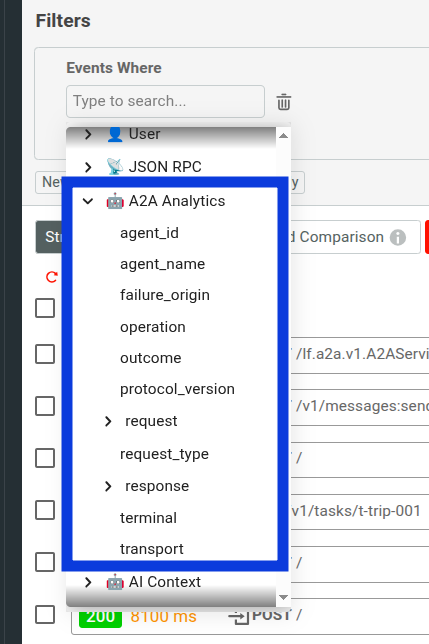
In each of the following steps, you filter and group events by fields under the A2A Analytics filter. In the Filters or Group By pane, select A2A Analytics. Then select the field you need, such as A2A Analytics.response.task_state.
The following shows the fields under the A2A Analytics filter:
If your app also receives other traffic, your charts show higher numbers than the ones in this tutorial. To see only the tutorial events, filter A2A Analytics.agentName by the four agent names in the sample events.
-
Group A2A traffic by agent and operation.
a. Open a new Segmentation analysis.
b. In the Filters pane, add a filter that keeps only A2A events. You can do this by, for example, selecting the
A2A Analytics.transportfilter with the exists operator.c. In Group By, specify two fields to categorize the chart by:
A2A Analytics.agent_nameandA2A Analytics.operation.d. Set the time range to the last hour.
e. Select the Event Count metric.
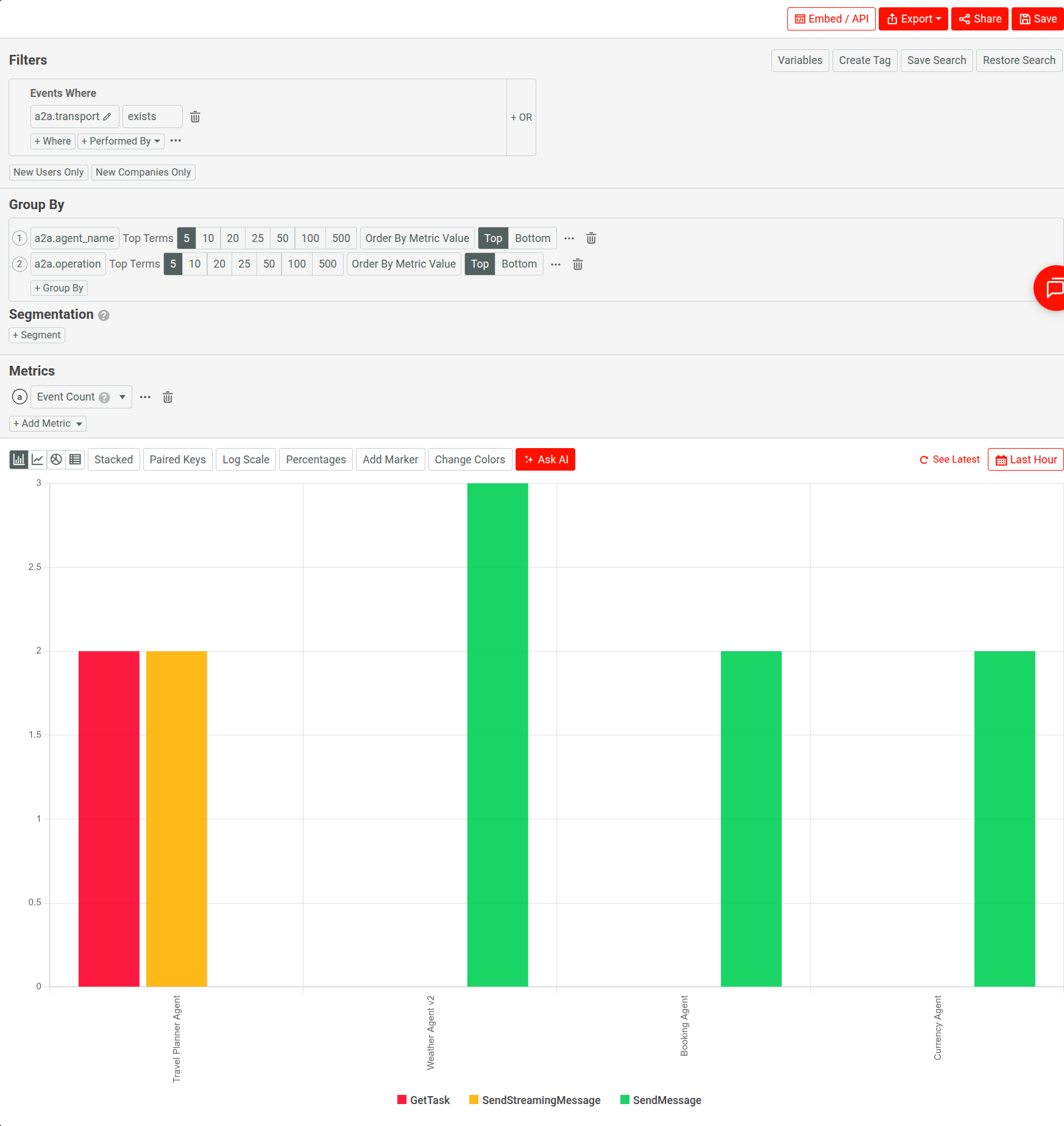
The chart shows how many calls each agent received, split by operation. The Travel Planner Agent handled two
SendStreamingMessagecalls and twoGetTaskcalls. The other agents only receivedSendMessagecalls.The following example shows a segmentation chart of A2A traffic grouped by agent and operation:

-
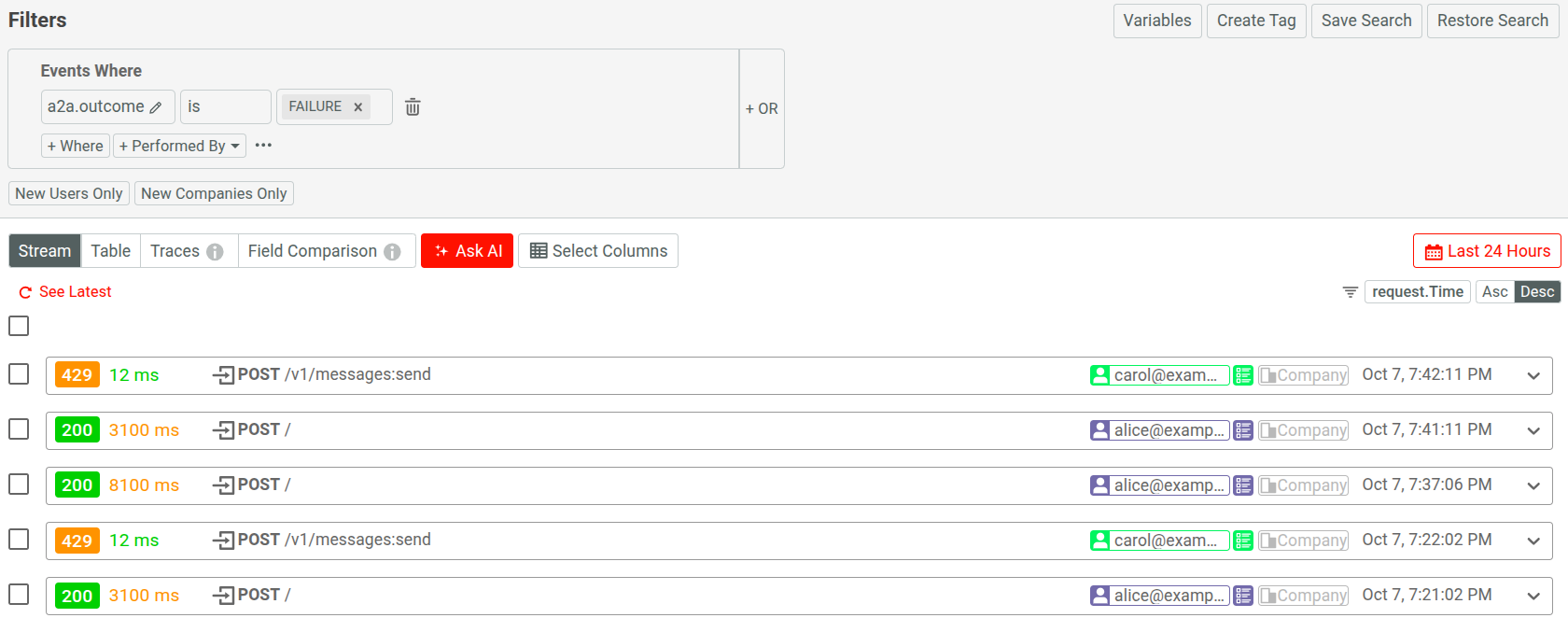
Find failed calls and where the failures come from. Open a Live Event Log workspace and add a filter where
A2A Analytics.outcomeisFAILURE. The events you observe are failures with different origins:- Weather Agent v2:
failure_originisUPSTREAMandis_errorisfalse. The call returns a task with the HTTP200 OKstatus code. However, the agent ends the task in theTASK_STATE_FAILEDstate. - Booking Agent:
failure_originisPOLICYandis_erroristrue. A gateway policy rejects the call with HTTP status429.
A chart that counts only HTTP errors misses the weather agent’s failure. For more information, see Errors and Outcomes.
The following example shows failed A2A calls. Expanding each event for more details allows you to observe further information about the failures.

- Weather Agent v2:
-
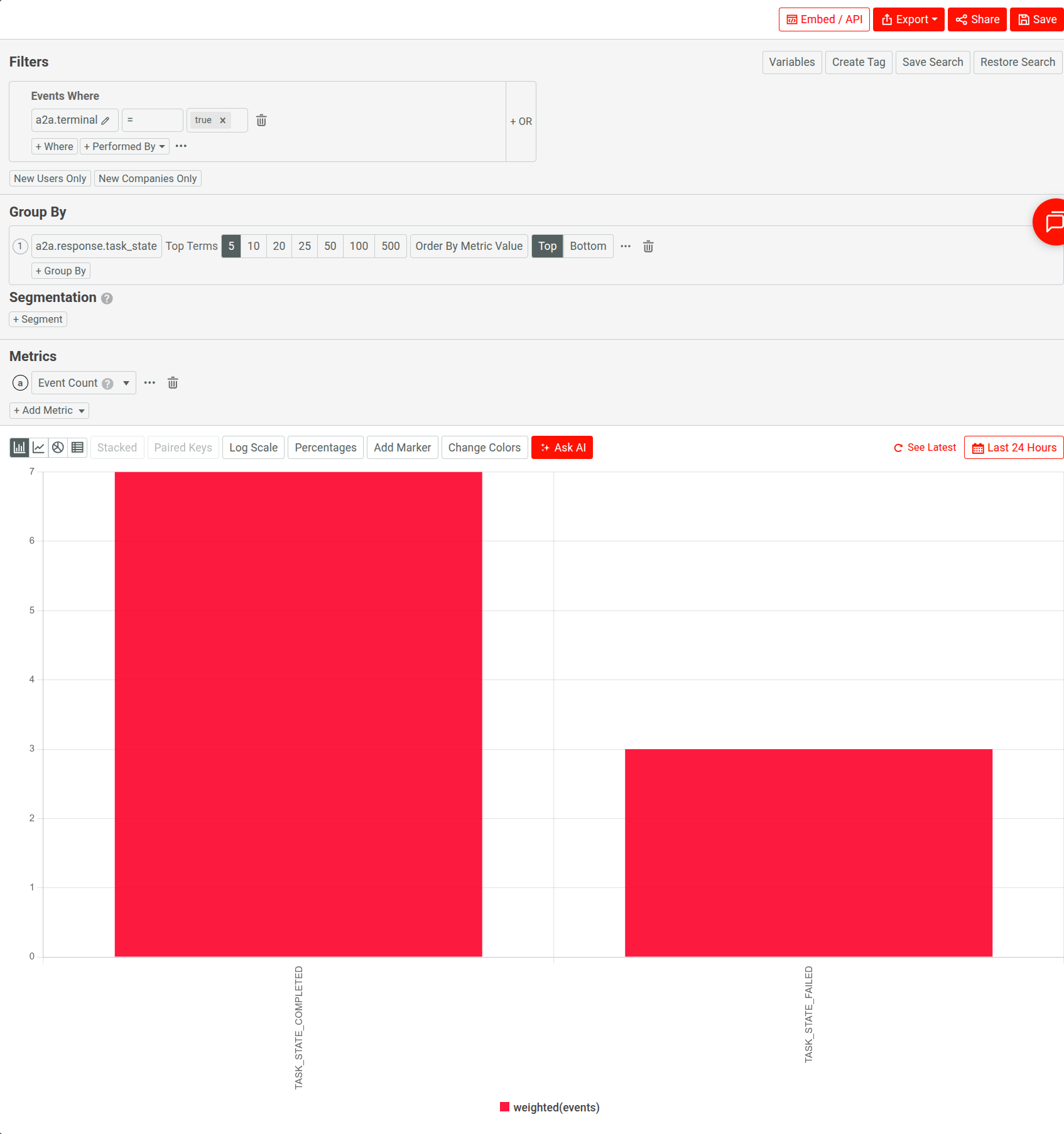
Check how tasks end.
a. Open a Segmentation analysis workspace and add a filter where
A2A Analytics.terminalistrue.b. Set the group in the Group By pane to
A2A Analytics.response.task_state.The chart shows how many tasks reached each final state, such as
TASK_STATE_COMPLETEDorTASK_STATE_FAILED.Here’s an example:

-
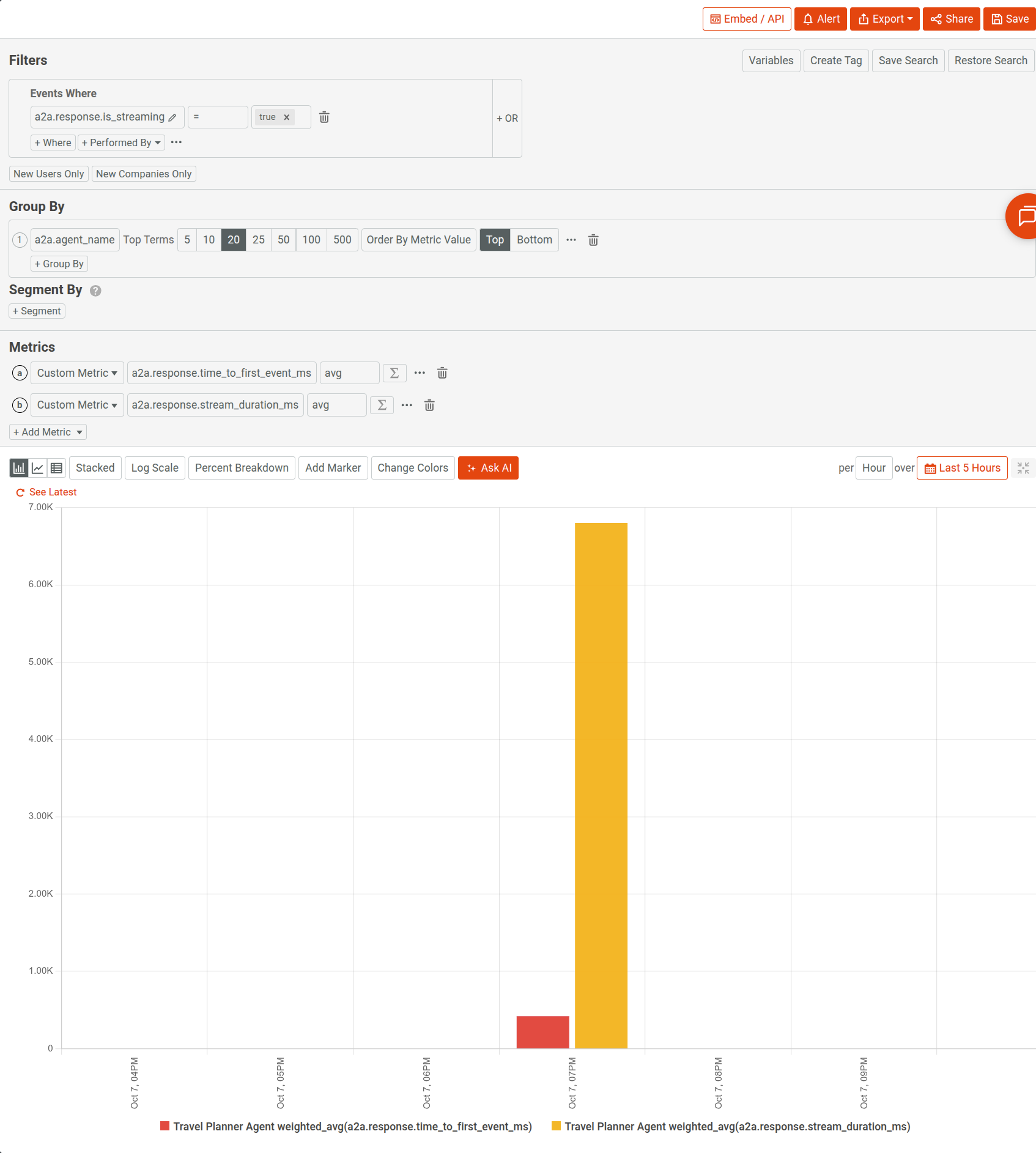
Measure how quickly streaming agents respond.
a. Open a new Time Series analysis.
b. Add a filter where
A2A Analytics.response.is_streamingistrue.c. For the metric, create a custom metric on the average of the
A2A Analytics.response.time_to_first_event_msfield. Add a second custom metric for the average ofA2A Analytics.response.stream_duration_ms.d. In the Group By pane, select
A2A Analytics.agentName.For the Travel Planner Agent, the first event arrives after 420 milliseconds. The stream lasts 6.8 seconds. Time to first event shows how long the caller waits before receiving any data. For more information, see Streaming Metrics.
The following example shows the average time to first event of streaming A2A calls, by agent:

-
Follow one conversation across calls.
a. Open a Live Event Log workspace.
b. Add a filter where
A2A Analytics.response.context_idisc-trip-42. Both events in this conversation report the context ID in their response.The log shows events from the same conversation. The
SendStreamingMessagecall over JSON-RPC creates taskt-trip-001. The laterGetTaskcall over HTTP+JSON fetches the same task. -
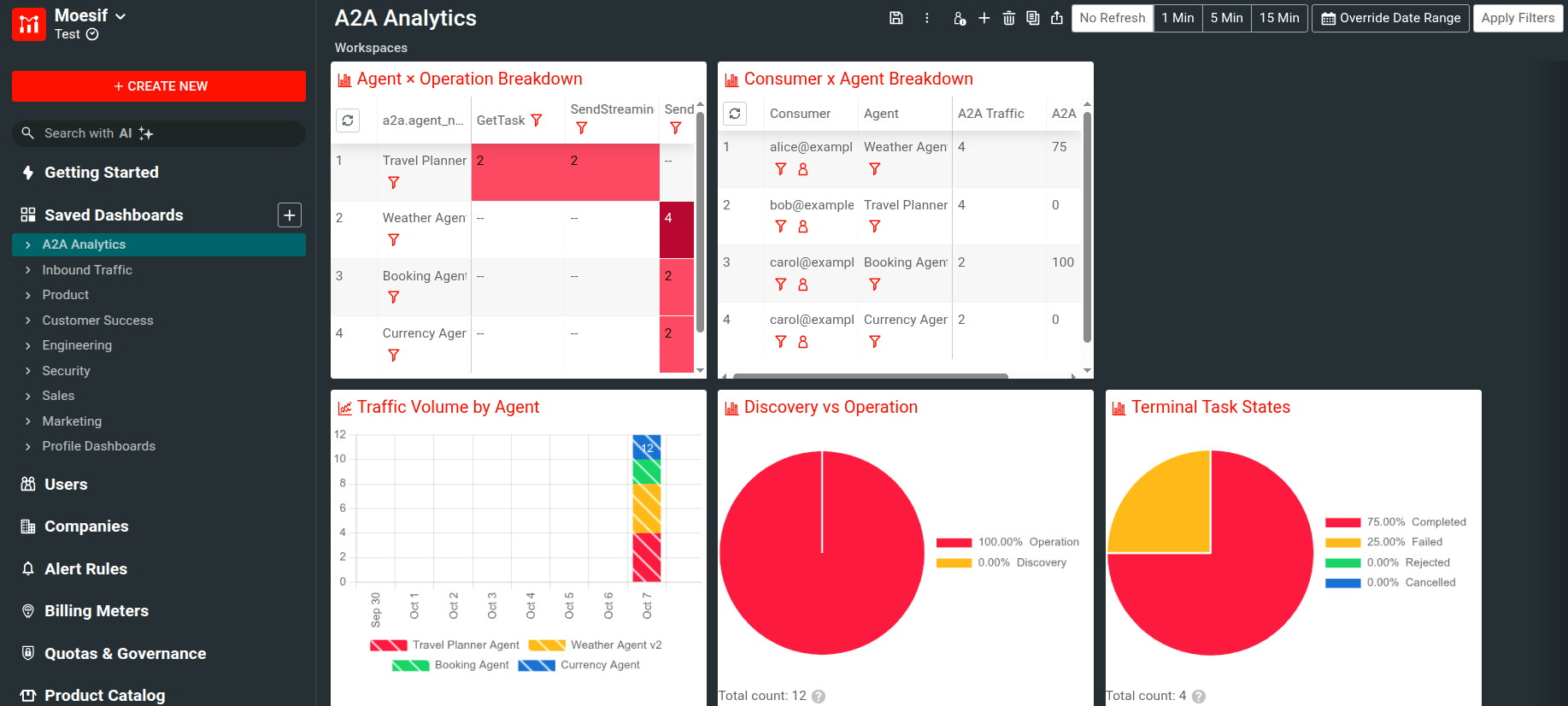
Create a dashboard for A2A traffic.
To monitor A2A traffic over time, create a dashboard from the prebuilt A2A Analytics template. The template creates charts for latency trends by agent, error rate, traffic volume, and the breakdown of agents by operation.
a. In Moesif Portal, select + Create New in the navigation menu.
b. Select Dashboard Templates.
c. Select the A2A Analytics template.
The new dashboard appears under Saved Dashboards. The following example shows a dashboard created from the template:

You can also save any chart from the previous steps to the same dashboard. In the chart’s workspace, select Save.
Summary
In this tutorial, you learned how to:
- Send A2A events to Moesif with an
a2aobject over all three transports. - Group A2A traffic by agent and operation.
- Distinguish protocol errors from failed tasks.
- Attribute each failure to a responsible party with
failure_origin. - Measure streaming responsiveness with
time_to_first_event_ms. - Follow a conversation across operations and transports with
context_id.
Next Steps
- Learn how A2A Analytics works and which use cases it supports in A2A Analytics.
- For the full list of fields, their allowed values, and validation rules, see A2A Analytics Filters.
- Set up alerts that notify you when the number of failed A2A calls increases for an agent.